หลักสูตร AI สำหรับดีไซเนอร์และครีเอทีฟAI for Designers & Creatives
อัปเดตล่าสุด 2026-07-23Last updated 2026-07-23
ไอเดียเร็วขึ้น งานซ้ำน้อยลง ด้วย AIFaster ideas, less repetitive work with AI
งานออกแบบต้องการไอเดียใหม่อยู่เสมอ แต่เวลาที่มีมักถูกใช้ไปกับงานทำซ้ำ เช่น ทำมู้ดบอร์ดหรือภาพอ้างอิงหลายเวอร์ชัน คอร์สนี้สอนวิธีใช้ AI Image สร้างภาพและคอนเซปต์จากบรีฟได้เร็วขึ้น พร้อมประยุกต์เข้ากับเครื่องมือที่ใช้อยู่จริงอย่าง Canva และ Figma เหมาะกับกราฟิกดีไซเนอร์ UX/UI อาร์ตไดเรกเตอร์ และฟรีแลนซ์สายครีเอทีฟที่ต้องการเวลาไปโฟกัสกับความคิดสร้างสรรค์มากขึ้นDesign work constantly needs fresh ideas, yet much of the available time goes into repetitive tasks like producing multiple moodboard versions. This course teaches you to use AI image tools to generate visuals and concepts from a brief faster, and apply them directly within tools you already use like Canva and Figma. Built for graphic designers, UX/UI designers, art directors, and creative freelancers who want more time for actual creative thinking.
สรุปสั้นTL;DR
หลักสูตร AI สำหรับดีไซเนอร์และครีเอทีฟ โดย AI Trainer Thailand คือคอร์สอบรม AI ภาคปฏิบัติ 1 วัน สำหรับกราฟิกดีไซเนอร์ UX/UI อาร์ตไดเรกเตอร์ และฟรีแลนซ์สายครีเอทีฟ ผู้เรียนจะได้ใช้ AI Image สร้างภาพ มู้ดบอร์ด และคอนเซปต์จากบรีฟได้เร็วขึ้น พร้อมประยุกต์เข้ากับเครื่องมือที่ใช้อยู่จริงอย่าง Canva และ Figma เพื่อลดงานทำซ้ำและมีเวลาโฟกัสกับความคิดสร้างสรรค์มากขึ้น จัดได้ทั้งแบบ onsite ทั่วประเทศและออนไลน์ มีใบรับรอง พร้อมปรึกษาและขอใบเสนอราคาฟรีภายใน 24 ชั่วโมง หลักสูตรนี้เป็น 1 ใน 64 หลักสูตรของ AI Trainer Thailand ที่จัดอบรม AI ให้แล้วกว่า 100 องค์กร รวมถึงผู้เข้าอบรมจาก 9 หน่วยงานภาครัฐThe AI for Designers & Creatives course by AI Trainer Thailand is a hands-on 1-day AI training for graphic designers, UX/UI designers, art directors, and creative freelancers. Participants use AI image tools to generate visuals, moodboards, and concepts from a brief faster, applied directly within tools they already use like Canva and Figma, cutting repetitive work and freeing time for creative thinking. Delivered onsite nationwide or online, with a certificate, and a free consultation and quote within 24 hours. This is one of AI Trainer Thailand's 64 courses; the team has trained 100+ organizations, including participants from 9 government agencies.
หลักสูตรนี้สำหรับทีมออกแบบ/UX ในองค์กร หากคุณเป็นเอเจนซี่ที่รับงานลูกค้าหลายราย ดู หลักสูตร AI สำหรับเอเจนซี่ และถ้าเป็นครีเอเตอร์/อินฟลูเอนเซอร์ที่ผลิตคอนเทนต์เอง ดู หลักสูตร AI สำหรับครีเอเตอร์This course is for in-house design/UX teams. If you run an agency serving multiple clients, see the AI for Agencies course; if you are a creator/influencer producing your own content, see the AI for Creators course.
สิ่งที่คุณจะได้เรียนWhat You'll Learn
- สร้างภาพอ้างอิงและมู้ดบอร์ดจากคำอธิบายสั้นๆ ด้วย AI ImageGenerate reference images and moodboards from short prompts with AI
- เขียนพรอมต์ให้ได้สไตล์ภาพตรงตามโจทย์ลูกค้าWrite prompts that nail the visual style a client wants
- สร้างไอเดียคอนเซปต์งานออกแบบจากบรีฟที่กำกวมTurn vague creative briefs into concrete design concepts
- ใช้ AI ช่วยขยายไอเดียเป็นหลายทางเลือกให้ลูกค้าเลือกUse AI to expand one idea into multiple client-ready options
- ประยุกต์ AI เข้ากับเวิร์กโฟลว์ Canva และ FigmaIntegrate AI into your Canva and Figma workflow
- ปรับแต่งและแก้ไขภาพที่ AI สร้างให้ใช้งานได้จริงRefine and edit AI-generated images for real production use
- จัดการลิขสิทธิ์และข้อควรระวังเมื่อใช้ภาพจาก AIUnderstand copyright considerations when using AI-generated images
- สร้างพรีเซนต์เทชันงานออกแบบให้ลูกค้าเห็นภาพเร็วขึ้นBuild client presentations that convey design ideas faster
ตัวอย่างกำหนดการเวิร์กชอป 1 วันSample One-Day Workshop Agenda
ภาพรวมของวันอบรม ออกแบบให้ลงมือทำจริงตั้งแต่ชั่วโมงแรก โดยแต่ละช่วงต่อยอดจากหัวข้อในคอร์ส ตั้งแต่การสร้างมู้ดบอร์ดไปจนถึงการนำเสนองานต่อลูกค้าAn overview of the training day, designed for hands-on practice from the first hour. Each slot builds on the course topics, from creating moodboards to presenting work to clients.
10:30
เริ่มต้นกับ AI Image และมู้ดบอร์ดชุดแรกGetting started with AI image tools and your first moodboard
ผู้เข้าอบรมทำความรู้จักเครื่องมือ AI Image และลงมือสร้างภาพอ้างอิงกับมู้ดบอร์ดชุดแรกจากบรีฟจริงของตัวเอง เพื่อเห็นด้วยตาว่า AI ช่วยย่นเวลาในการหาแรงบันดาลใจและภาพตั้งต้นได้มากแค่ไหนParticipants get to know AI image tools and create their first set of reference images and a moodboard from their own real brief, seeing first-hand how much time AI saves in gathering inspiration and starting visuals.
12:00
เขียนพรอมต์ให้ตรงสไตล์ และตีโจทย์จากบรีฟWriting on-style prompts and cracking the brief
ฝึกเขียนพรอมต์ที่คุมโทน สี และสไตล์ของภาพให้ตรงกับสิ่งที่ลูกค้าต้องการ พร้อมลองแปลงบรีฟที่กำกวมให้กลายเป็นคอนเซปต์งานออกแบบที่จับต้องได้จริงPractice writing prompts that control tone, color, and visual style to match what a client wants, and turn a vague brief into concrete design concepts you can actually work with.
13:00
พักกลางวันLunch break
พักรับประทานอาหารและแลกเปลี่ยนไอเดียกับผู้เข้าอบรมท่านอื่นBreak for lunch and swap ideas with the other participants.
14:15
ขยายหนึ่งไอเดียเป็นหลายทางเลือกExpanding one idea into multiple options
ใช้ AI แตกไอเดียตั้งต้นออกเป็นทางเลือกหลายเวอร์ชันในเวลาอันสั้น เพื่อเตรียมชุดตัวเลือกที่หลากหลายให้ลูกค้าเปรียบเทียบและตัดสินใจได้ง่ายขึ้นUse AI to branch one starting idea into several versions quickly, preparing a varied set of options that makes it easier for clients to compare and decide.
15:30
เชื่อม AI เข้ากับ Canva และ FigmaConnecting AI into Canva and Figma
ลงมือนำภาพและองค์ประกอบที่ได้จาก AI ไปใช้ต่อในเวิร์กโฟลว์ Canva และ Figma ที่ทีมใช้อยู่จริง พร้อมเทคนิคปรับแต่งและแก้ไขภาพที่ AI สร้างให้พร้อมใช้งานในงานจริงTake the images and elements from AI into the Canva and Figma workflow your team already uses, with techniques for refining and editing AI-generated images so they are ready for real production.
16:30
ลิขสิทธิ์และการนำเสนอต่อลูกค้าCopyright and presenting to clients
ทบทวนข้อควรระวังและเรื่องลิขสิทธิ์เมื่อใช้ภาพจาก AI แล้วนำผลงานตลอดทั้งวันมาประกอบเป็นพรีเซนต์เทชันที่ช่วยให้ลูกค้าเห็นภาพและตัดสินใจได้เร็วขึ้นReview the cautions and copyright considerations of using AI-generated images, then assemble the day's work into a presentation that helps clients visualize and decide faster.
กำหนดการเป็นตัวอย่าง ปรับให้เข้ากับบริบทองค์กรของคุณได้This is a sample agenda and can be adapted to your organization's context.
หลักสูตรนี้เหมาะกับใครWho Should Attend
ผลลัพธ์ที่คุณจะได้กลับไปWhat You'll Walk Away With
คลังพรอมต์สร้างภาพและมู้ดบอร์ดที่ใช้งานได้ทันทีA ready-to-use prompt library for images and moodboards
เวิร์กโฟลว์ AI ที่เชื่อมกับ Canva/Figma พร้อมใช้An AI workflow integrated with Canva/Figma you can start using
แนวทางนำเสนองานออกแบบให้ลูกค้าตัดสินใจได้เร็วขึ้นA presentation approach that helps clients decide faster
ตัวอย่างการใช้งานจริงหลังอบรมHow Teams Apply This After the Workshop
กราฟิกดีไซเนอร์อินเฮาส์ที่ต้องทำภาพแคมเปญหลายชิ้นต่อเดือนAn in-house graphic designer producing many campaign visuals each month
ก่อนอบรม เวลาส่วนใหญ่หมดไปกับการไล่หาภาพอ้างอิงและทำมู้ดบอร์ดทีละเวอร์ชันด้วยมือสำหรับทุกบรีฟแคมเปญ จนแทบไม่เหลือเวลาไปคิดงานออกแบบจริง หลังอบรม ดีไซเนอร์สร้างภาพอ้างอิงและมู้ดบอร์ดจากพรอมต์สั้นๆ ได้ในไม่กี่นาที นำหลายทิศทางไปเสนอทีมการตลาดตั้งแต่รอบประชุมแรก แล้วทุ่มเวลาที่เหลือไปกับการขัดเกลาคอนเซปต์ที่ถูกเลือกให้สมบูรณ์ขึ้นBefore the workshop, most of the time went into hunting for reference images and building moodboards by hand for every campaign brief, leaving little room for actual design thinking. Afterward, the designer generates reference images and moodboards from short prompts in minutes, brings several directions to the marketing team in the very first meeting, and spends the remaining time polishing the chosen concept.
UX/UI Designer ที่ต้องมีภาพคอนเซปต์ประกอบโปรโตไทป์ให้เร็วA UX/UI designer who needs concept visuals for prototypes quickly
ก่อนอบรม ต้องรอภาพสต็อกหรือสเก็ตช์คร่าวๆ มาเติมในม็อกอัป Figma ทำให้รอบการรีวิวกับผู้เกี่ยวข้องช้าลง หลังอบรม ใช้ AI สร้างภาพคอนเซปต์และภาพประกอบชั่วคราวที่วางลงใน Figma ได้ทันที ทำให้ผู้เกี่ยวข้องเห็นของที่จับต้องได้และให้ฟีดแบ็กได้เร็วขึ้นตั้งแต่ต้นBefore the workshop, they had to wait for stock imagery or rough sketches to fill in Figma mockups, which slowed down review cycles with stakeholders. Afterward, they use AI to create concept visuals and placeholder imagery that drop straight into Figma, so stakeholders see something concrete and give feedback sooner.
ฟรีแลนซ์อาร์ตไดเรกเตอร์ที่รับงานหลายลูกค้าพร้อมบรีฟกำกวมA freelance art director juggling several clients with vague briefs
ก่อนอบรม ต้องส่งอีเมลถามกลับไปมาหลายรอบเพื่อเดาว่าลูกค้าต้องการอะไรกันแน่ และมักต้องรื้อทิศทางงานใหม่เมื่อเข้าใจคลาดเคลื่อน หลังอบรม แปลงบรีฟที่กำกวมให้เป็นคอนเซปต์ภาพหลายแบบด้วย AI แล้วส่งตัวเลือกให้ลูกค้าดูตั้งแต่เนิ่นๆ เพื่อตกลงทิศทางให้ตรงกันก่อนจะลงแรงทำงานจริงเป็นชั่วโมงBefore the workshop, they exchanged many rounds of email trying to guess what a client actually wanted, and often had to rework a direction after a misread. Afterward, they turn a vague brief into several concrete visual concepts with AI and share the options early, aligning on direction before committing hours to production.
ทำไมต้องเรียนกับเราWhy Train With Us
หน่วยงานภาครัฐไว้วางใจให้จัดอบรม AI ระดับประเทศgovernment agencies trusted us to deliver national-level AI training
องค์กรภาครัฐและเอกชนที่ผ่านการอบรมกับเราpublic and private organizations have trained with us
หลักสูตร AI ในแค็ตตาล็อกของเรา หลักสูตรครีเอทีฟเป็นหนึ่งในนั้นAI courses in our catalog — this creative course is one of them
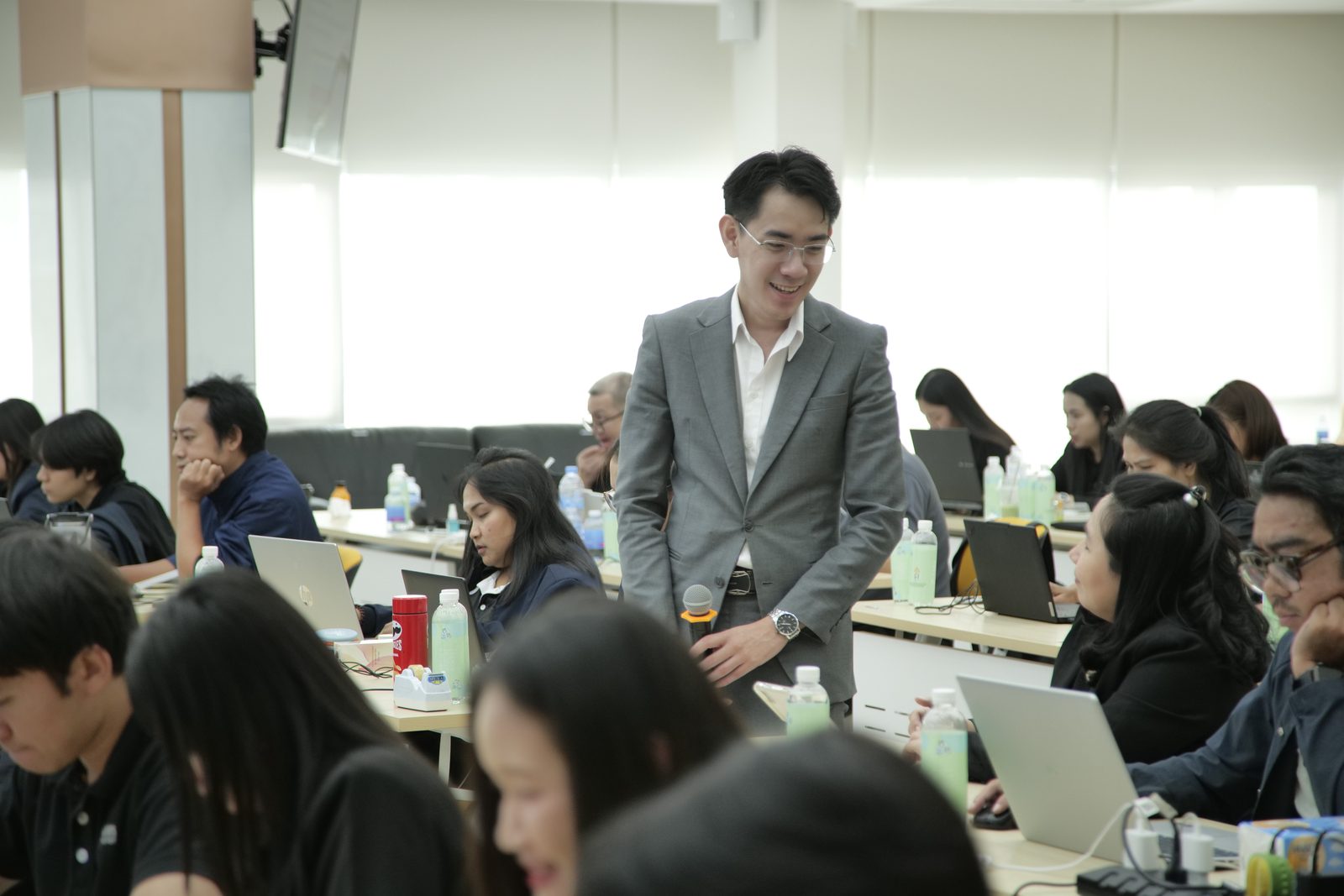
ผลงานล่าสุดคือเวิร์กชอป "PR MOF CONNECT: DIGITAL TRANSFORMATION" ให้ทีมงานจาก 9 หน่วยงานภาครัฐ — มาตรฐานเดียวกันนี้คือสิ่งที่เรานำมาสู่ทีมออกแบบและครีเอทีฟของคุณOur latest work is the "PR MOF CONNECT: DIGITAL TRANSFORMATION" workshop for teams from 9 government agencies — the same standard we bring to your design and creative team.
อ่านเคสระดับประเทศฉบับเต็ม พร้อมภาพ 16 ภาพRead the full national case with 16 photosใช้ AI ร่วมกับ Canva และ Figma ยังไงHow to Use AI Together with Canva and Figma
เริ่มจากใช้ AI Image สร้างภาพตั้งต้น มู้ดบอร์ด หรือคอนเซปต์จากบรีฟ แล้วนำภาพและองค์ประกอบเข้าไปจัดวางและปรับแต่งเป็นเลย์เอาต์ใน Canva สำหรับงานกราฟิก หรือใน Figma สำหรับงาน UX/UI พร้อมใช้ AI ช่วยคิดข้อความและแตกไอเดียหลายเวอร์ชัน ในคลาสผู้เรียนจะได้ลงมือทำเวิร์กโฟลว์นี้กับงานจริงของตัวเองStart by using AI image tools to generate base visuals, moodboards, or concepts from a brief, then bring them into Canva for graphics or Figma for UX/UI to arrange and refine into a layout, using AI to draft copy and multiple idea variations along the way. In class, participants run this workflow on their own real work.
AI จะแทนดีไซเนอร์ไหมWill AI Replace Designers?
ไม่ AI เป็นตัวช่วยเร่งงานร่าง มู้ดบอร์ด และการแตกไอเดีย แต่การตัดสินใจด้านรสนิยม การเล่าเรื่องด้วยภาพ และการเข้าใจบรีฟกับแบรนด์ยังต้องอาศัยดีไซเนอร์ คอร์สนี้สอนให้ใช้ AI เป็นผู้ช่วยที่ทำให้ดีไซเนอร์ทำงานเร็วขึ้นและมีเวลาโฟกัสกับความคิดสร้างสรรค์ โดยคนยังเป็นผู้ตัดสินใจสุดท้ายเสมอNo. AI accelerates drafting, moodboards, and idea generation, but taste decisions, visual storytelling, and understanding the brief and brand still rely on the designer. This course teaches using AI as an assistant that makes designers faster and frees time for creativity — with a human always making the final call.
เลือกบริษัทอบรม AI ครีเอทีฟยังไง — เช็กลิสต์ 5 ข้อHow to Choose an AI-for-Creatives Training Provider — 5-Point Checklist
- ฝึกกับบรีฟและโปรเจกต์จริงของทีม ไม่ใช่โจทย์สมมติPractices on the team's real briefs and projects, not mock exercises.
- ต่อยอดกับเครื่องมือที่ทีมใช้อยู่ เช่น Canva และ FigmaBuilds on tools the team already uses, like Canva and Figma.
- มีผลงานจริงกับองค์กรหลากหลาย — AI Trainer Thailand อบรมมาแล้วกว่า 100 องค์กร รวมถึงผู้เข้าอบรมจาก 9 หน่วยงานภาครัฐHas a real track record — AI Trainer Thailand has trained 100+ organizations, including participants from 9 government agencies.
- วางบทบาท AI เป็นผู้ช่วย โดยดีไซเนอร์ยังเป็นผู้ตัดสินใจสุดท้ายPositions AI as an assistant, with the designer making the final call.
- ให้ใบเสนอราคาฟรีภายใน 24 ชั่วโมง และเลือกได้ทั้ง Onsite และ OnlineProvides a free quote within 24 hours, with both Onsite and Online options.
| เกณฑ์Criteria | เวิร์กชอปสำหรับทีมออกแบบ (หลักสูตรนี้)Workshop for design teams (this course) | คอร์สออนไลน์สำเร็จรูปPre-recorded online course | ลองใช้ AI เองจากคลิปSelf-learning from videos |
|---|---|---|---|
| ฝึกกับบรีฟจริงPractice on real briefs | ใช้โปรเจกต์และแบรนด์ของทีมUses the team's projects and brand | ตัวอย่างกลางๆGeneric examples | ลองเองกับงานจริงSelf-experiment on the job |
| ต่อยอด Canva/FigmaFits Canva/Figma | สอนเวิร์กโฟลว์กับเครื่องมือที่ใช้อยู่Teaches a workflow with tools you use | มักสอนแยกเครื่องมือOften tool-isolated | ต้องต่อภาพเองPiece it together yourself |
| ฟีดแบ็กงานจริงFeedback on real work | โค้ชดูงานและปรับสดในคลาสCoach reviews and refines live | ไม่มีฟีดแบ็กNo feedback | ไม่มีNone |
| ทั้งทีมเริ่มพร้อมกันWhole team starts together | อบรมทั้งทีมในครั้งเดียวTrains the whole team at once | ต่างคนต่างเรียนEveryone learns separately | ไม่เป็นระบบUnstructured |
คำถามที่พบบ่อยFAQ
ต้องมีพื้นฐาน AI มาก่อนไหมDo I need prior AI experience?
ไม่จำเป็น เหมาะกับทุกระดับตั้งแต่ไม่เคยใช้ AI Image มาก่อนNo — suitable for all levels, even if you've never used AI image tools before.
เรียนกี่วัน รูปแบบอย่างไรHow long is the course and what's the format?
เวิร์กช็อป 1 วัน ลงมือสร้างภาพและมู้ดบอร์ดจริงตลอดคอร์สA one-day hands-on workshop where you generate real images and moodboards throughout.
ปรับเนื้อหาให้องค์กรได้ไหม และราคา/ใบเสนอราคาเป็นอย่างไรCan the content be customized, and how much does it cost?
ได้ สามารถนำโปรเจกต์หรือแบรนด์ของทีมมาใช้เป็นกรณีศึกษาในการฝึก ส่วนเรื่องราคา ติดต่อทีมงานแจ้งจำนวนผู้เข้าอบรมเพื่อรับใบเสนอราคาYes, we can use your team's actual projects or brand as case studies in the workshop. As for pricing, contact our team with your group size to receive a quote.
คอร์สใช้เครื่องมืออะไรบ้าง และต้องเตรียมอะไรมาWhat tools does the course use, and what should I prepare?
เน้นใช้ AI Image ร่วมกับ Canva และ Figma ซึ่งหลายทีมออกแบบใช้อยู่แล้ว ผู้เข้าอบรมเตรียมโน้ตบุ๊กและบรีฟหรือโปรเจกต์จริงมาฝึกได้เลย โดยทีมงานจะแนะนำการตั้งค่าบัญชีเครื่องมือให้พร้อมก่อนเริ่มเวิร์กชอปThe course focuses on AI image tools together with Canva and Figma, which many design teams already use. Bring a laptop and a real brief or project to practice with; our team will guide you on setting up the tool accounts before the workshop begins.
ข้อมูลงานหรือบรีฟลูกค้าที่นำมาใช้ในคลาส ปลอดภัยไหมIs the client work or brief I bring to class kept safe?
เราแนะนำให้ใช้ข้อมูลเท่าที่จำเป็น และหลีกเลี่ยงการใส่ข้อมูลส่วนบุคคลหรือข้อมูลลับลงในเครื่องมือ AI ในเวิร์กชอปจะสอนแนวทางการเลือกข้อมูลที่เหมาะสมและข้อควรระวังด้านความเป็นส่วนตัวเมื่อทำงานกับบรีฟจริง เพื่อให้ทีมนำไปปรับใช้กับนโยบายขององค์กรได้We recommend using only the data you need and avoiding personal or confidential information in AI tools. The workshop covers how to choose appropriate inputs and the privacy cautions to keep in mind when working with real briefs, so your team can align it with your organization's policy.
เครื่องมือ AI เปลี่ยนเร็วมาก จะตามให้ทันได้อย่างไรหลังจบคอร์สAI tools change fast — how do I keep up after the course?
คอร์สเน้นหลักการเขียนพรอมต์และเวิร์กโฟลว์ที่ปรับใช้ได้แม้เครื่องมือจะเปลี่ยนรุ่น เพื่อให้ทีมต่อยอดกับ AI Image ตัวใหม่ได้ด้วยตัวเอง พร้อมคลังพรอมต์และแนวทางที่นำกลับไปใช้และอัปเดตต่อได้เรื่อยๆThe course emphasizes prompt-writing principles and workflows that hold up even as tools change versions, so your team can adapt to newer AI image tools on their own — along with a prompt library and approach you can reuse and keep updating.
ใช้ AI ร่วมกับ Canva และ Figma ยังไงHow do you use AI together with Canva and Figma?
เริ่มจากใช้ AI Image สร้างภาพตั้งต้น มู้ดบอร์ด หรือคอนเซปต์จากบรีฟ แล้วนำภาพและองค์ประกอบเข้าไปจัดวาง ปรับแต่ง และทำเป็นเลย์เอาต์ใน Canva สำหรับงานกราฟิก หรือใน Figma สำหรับงาน UX/UI ต่อ นอกจากนี้ยังใช้ AI ช่วยคิดข้อความ ตั้งชื่อ และแตกไอเดียหลายเวอร์ชันก่อนนำไปประกอบในสองเครื่องมือนี้ ในคลาสผู้เรียนจะได้ลงมือทำเวิร์กโฟลว์นี้กับงานจริงStart by using AI image tools to generate base visuals, moodboards, or concepts from a brief, then bring the images and elements into Canva for graphics or Figma for UX/UI to arrange, refine, and lay out. You also use AI to draft copy, names, and multiple idea variations before assembling them in those two tools. In class, participants run this workflow on real work.
AI จะแทนดีไซเนอร์ไหมWill AI replace designers?
ไม่ AI เป็นตัวช่วยเร่งงานร่าง มู้ดบอร์ด และการแตกไอเดีย แต่การตัดสินใจด้านรสนิยม การเล่าเรื่องด้วยภาพ และการเข้าใจบรีฟกับแบรนด์ยังต้องอาศัยดีไซเนอร์ คอร์สนี้จึงสอนให้ใช้ AI เป็นผู้ช่วยที่ทำให้ดีไซเนอร์ทำงานเร็วขึ้นและมีเวลาโฟกัสกับความคิดสร้างสรรค์ โดยคนยังเป็นผู้ตัดสินใจสุดท้ายเสมอNo. AI accelerates drafting, moodboards, and idea generation, but taste decisions, visual storytelling, and understanding the brief and brand still rely on the designer. This course teaches using AI as an assistant that makes designers faster and frees time for creativity — with a human always making the final call.
อบรม AI ดีไซเนอร์ ราคาเท่าไหร่How much does AI-for-designers training cost?
ค่าอบรมขึ้นอยู่กับปัจจัยเหล่านี้:The fee depends on these factors:
- จำนวนผู้เรียนในทีมNumber of participants
- รูปแบบ Onsite หรือ OnlineOnsite or Online format
- ระยะเวลาครึ่งวันหรือเต็มวันHalf-day or full-day
- ความซับซ้อนของเนื้อหาที่ปรับให้ตรงกับงานจริงContent complexity and customization
แจ้งความต้องการเข้ามา ทีมงานจัดทำใบเสนอราคาฟรีภายใน 24 ชั่วโมงSend us your needs and we will prepare a free quote within 24 hours.
หลักสูตรที่เกี่ยวข้องRelated Courses
สนใจหลักสูตรนี้สำหรับทีมของคุณ?Interested in This Course for Your Team?
ปรึกษาฟรี ไม่มีข้อผูกมัด — ปรับเนื้อหาให้ตรงกับธุรกิจของคุณ พร้อมใบเสนอราคาภายใน 24 ชั่วโมงFree consultation, no strings attached — content tailored to your business, quote within 24 hours.
ปรึกษาฟรี / ขอใบเสนอราคาFree Consultation / Get a Quote