คอร์สทำสไลด์และพรีเซนต์ด้วย AI สำหรับทีมองค์กรAI Presentation Course — Build Slides and Present Better with AI
อัปเดตล่าสุด 2026-10-15Last updated 2026-10-15
ให้ AI ช่วยเรื่องโครงเรื่องและร่างแรก ส่วนสารหลัก ตัวเลข และการตัดสินใจยังอยู่ในมือคุณLet AI handle the structure and the first draft, while the message, the numbers and the judgement stay with you
งานนำเสนอในองค์กรส่วนใหญ่ไม่ได้ยากที่การออกแบบ แต่ยากที่ต้องทำซ้ำทุกเดือน ทั้งสไลด์ประชุมผู้บริหาร รายงานผลไตรมาส ข้อเสนอโครงการขออนุมัติงบ และเด็คเสนอลูกค้า หลายคนนั่งมองไฟล์เปล่านานกว่าตอนลงมือทำจริง พอลองให้ AI สร้างสไลด์ทั้งชุดก็ได้หน้าตาสวย แต่เนื้อหากว้าง ๆ ตัวเลขผิด และฟอนต์กับสีหลุดจากเทมเพลตบริษัท หลักสูตรนี้สอนใช้ AI ทำงานนำเสนอเป็นขั้นตอน ตั้งแต่สรุปบรีฟ หาสารหลัก วางสตอรีไลน์ ร่างสไลด์ ทำภาพและกราฟ เขียนโน้ตผู้พูด จนถึงซ้อมรับคำถามยาก โดยคนนำเสนอยังเป็นเจ้าของสาร ตัวเลข และการตัดสินใจทุกจุดIn most companies the hard part of presenting isn't the design — it's doing it again every month: management meeting slides, quarterly results, project proposals asking for budget, sales decks for clients. Many people stare at a blank file longer than they spend building it. Ask AI to generate a whole deck and it looks polished, but the content is generic, the numbers are wrong, and the fonts and colours drift away from the company template. This course teaches a step-by-step way to use AI for presentations — summarising the brief, finding the key message, building the storyline, drafting slides, creating visuals and charts, writing speaker notes and rehearsing tough questions — while the presenter stays the owner of the message, the numbers and every judgement call.
สรุปสั้นTL;DR
คอร์สทำสไลด์ด้วย AI ของ AI Trainer Thailand คือเวิร์กชอปภาคปฏิบัติ 1 วัน (ปรับได้) ที่สอนทีมองค์กรใช้ AI ทำงานนำเสนอครบทั้งกระบวนการ ตั้งแต่สรุปบรีฟ หาสารหลัก วางสตอรีไลน์ ร่างสไลด์ทีละหน้า ทำภาพและกราฟ เขียนโน้ตผู้พูด ไปจนถึงซ้อมตอบคำถามโดยให้ AI สวมบทผู้บริหารที่ถามยาก ฝึกทั้งกับ AI ใน PowerPoint และเครื่องมือสร้างสไลด์อย่าง Gamma และ Canva โดยคุมเทมเพลตบริษัทไม่ให้เพี้ยน AI ช่วยเรื่องโครงและร่างแรก ส่วนสารหลัก ตัวเลข และการตัดสินใจยังเป็นของคนนำเสนอ AI Trainer Thailand จัดอบรม AI ให้แล้วกว่า 100 องค์กร รวมถึงผู้เข้าอบรมจาก 9 หน่วยงานภาครัฐ ด้วยหลักสูตรทั้งหมด 64 หลักสูตร จัดได้ทั้งแบบ Onsite ทั่วประเทศและออนไลน์ มีใบรับรอง ปรึกษาและขอใบเสนอราคาฟรีภายใน 24 ชั่วโมงThe AI Presentation Course by AI Trainer Thailand is a hands-on one-day (flexible) workshop that teaches corporate teams to use AI across the whole presentation process — summarising the brief, finding the key message, building the storyline, drafting slide by slide, creating visuals and charts, writing speaker notes, and rehearsing Q&A with AI playing a tough executive. Teams practise with AI inside PowerPoint and with deck tools such as Gamma and Canva while keeping the company template intact. AI handles structure and first drafts; the message, the numbers and the judgement stay with the presenter. AI Trainer Thailand has delivered AI training to 100+ organizations, including participants from 9 government agencies, across 64 courses. It runs onsite nationwide or online, includes a certificate, with free consultation and a quote within 24 hours.
ทำสไลด์ด้วย AI คืออะไรWhat does making slides with AI actually mean?
ทำสไลด์ด้วย AI คือการใช้เครื่องมือ AI ช่วยงานนำเสนอทีละช่วง ทั้งย่อเอกสารยาวให้เหลือประเด็น เสนอโครงเรื่อง ร่างข้อความแต่ละหน้า ทำภาพประกอบและกราฟ และเขียนโน้ตผู้พูด โดยคนนำเสนอเป็นผู้กำหนดสารหลัก ตรวจตัวเลข และตัดสินว่าจะพูดอะไรกับใคร ไม่ใช่กดปุ่มเดียวแล้วได้เด็คพร้อมขึ้นจอMaking slides with AI means using AI tools at each stage of a presentation — condensing long documents into points, proposing a structure, drafting each slide's text, creating images and charts, and writing speaker notes — while the presenter sets the key message, checks the numbers and decides what to say to whom. It is not one click to a ready-to-present deck.
AI ทำสไลด์เก่งตรงไหน และตรงไหนที่คนต้องคุมเองWhere is AI strong at slides, and where must people stay in control?
AI เก่งงานจัดระเบียบและร่างเร็ว เช่น แตกโครงเรื่อง เรียงลำดับเหตุผล เขียนหัวสไลด์ให้กระชับ เกลาภาษา และเสนอภาพหรือรูปแบบกราฟ แต่ AI ไม่รู้ว่าผู้บริหารในห้องกังวลเรื่องอะไร ไม่รู้ว่าเรื่องไหนยังเปิดเผยไม่ได้ และพิมพ์ตัวเลขผิดได้ทั้งที่ดูมั่นใจ เรื่องสาร ตัวเลข และการตัดสินใจจึงต้องเป็นของคนAI is strong at organising and fast drafting — breaking down a structure, ordering arguments, writing tight slide titles, polishing language and suggesting images or chart types. But it doesn't know what the executives in the room are worried about or what can't be disclosed yet, and it can type wrong numbers with full confidence. The message, the numbers and the decisions have to stay with people.
| งานTask | AI ช่วยได้ดีWhere AI helps | คนต้องเป็นเจ้าของWhat people must own |
|---|---|---|
| โครงเรื่องStructure | เสนอโครงหลายแบบ เรียงลำดับเหตุผลProposes several outlines, orders the logic | เลือกสารหลักหนึ่งประโยคที่อยากให้ผู้ฟังจำChoosing the one-sentence message the audience must remember |
| ข้อความบนสไลด์Slide text | ย่อ เกลา เขียนหัวสไลด์แบบบอกข้อสรุปCondenses, polishes, writes conclusion-style titles | ตัดสินว่าอะไรพูดได้ อะไรยังไม่ควรเปิดเผยDeciding what can be said and what can't be disclosed yet |
| ตัวเลขและกราฟNumbers and charts | เสนอรูปแบบกราฟที่เข้ากับข้อความSuggests the chart type that fits the point | คำนวณจากไฟล์ต้นทางและตรวจทุกตัวเลขCalculating from the source file and checking every figure |
| ภาพประกอบVisuals | สร้างภาพหรือไอคอนประกอบตามแนวคิดGenerates images or icons for an idea | ตรวจสิทธิ์การใช้ภาพและความเข้ากันกับแบรนด์Checking image rights and brand fit |
| การพูดและตอบคำถามSpeaking and Q&A | ร่างโน้ตผู้พูด ตั้งคำถามยากให้ซ้อมDrafts speaker notes, poses tough practice questions | ตัดสินใจคำตอบและรับผิดชอบสิ่งที่พูดDeciding the answers and owning what is said |
ทำ PowerPoint ด้วย AI ใช้ตัวไหนดีWhich AI tool should you use for PowerPoint?
ไม่มีตัวเดียวที่เหมาะกับทุกงาน งานส่วนใหญ่ใช้สองตัวคู่กัน คือผู้ช่วย AI ทั่วไปอย่าง ChatGPT, Claude หรือ Gemini สำหรับคิดสตอรีไลน์และร่างเนื้อหา แล้วไปจบในเครื่องมือที่องค์กรใช้อยู่ ถ้าบริษัทใช้ PowerPoint และมี Copilot ก็ทำต่อในเทมเพลตบริษัท ถ้าเป็นงานเน้นภาพสำหรับคนนอกค่อยใช้ Canva หรือเครื่องมือสร้างสไลด์อย่าง GammaNo single tool fits every job. Most work pairs two: a general AI assistant such as ChatGPT, Claude or Gemini to think through the storyline and draft content, then finishing in the tool your organization already uses. If the company runs PowerPoint with Copilot, continue inside the company template; for visual-heavy decks for outside audiences, use Canva or a deck generator such as Gamma.
| แนวทางApproach | จุดแข็งStrengths | จุดที่ต้องระวังWeak spots | เหมาะใช้เมื่อUse it when |
|---|---|---|---|
| ผู้ช่วย AI ทั่วไป (ChatGPT, Claude, Gemini)General AI assistant (ChatGPT, Claude, Gemini) | คิดสตอรีไลน์ สรุปเอกสารยาว เขียนหัวสไลด์ ร่างโน้ตผู้พูด และสวมบทผู้ฟังให้ซ้อมStorylines, summarising long documents, slide titles, speaker notes, role-playing the audience | ไม่ได้ทำงานในเทมเพลตบริษัทโดยตรง ต้องนำเนื้อหาไปวางเองDoesn't work inside your company template; you move the content across yourself | ช่วงคิดก่อนเปิด PowerPoint ใช้ได้แทบทุกงานThe thinking stage before you open PowerPoint, for almost every deck |
| AI ใน PowerPoint (Copilot) หรือใน Google Slides (Gemini)AI inside PowerPoint (Copilot) or Google Slides (Gemini) | ร่างสไลด์ในไฟล์จริง สร้างเด็คจากเอกสาร Word ได้ ถ้าเริ่มจากเทมเพลตบริษัทจะยึดธีมและเลย์เอาต์ขององค์กรDrafts slides in the real file, can build a deck from a Word document, and keeps your theme and layouts when you start from the company template | ต้องมีสิทธิ์ใช้งานตามแพ็กเกจและการตั้งค่าของ IT ผลที่ได้ยังต้องเกลาและตรวจเนื้อหาNeeds the right licence and IT settings; output still needs editing and fact-checking | งานภายในที่ต้องอยู่ในเทมเพลตบริษัทInternal decks that must stay in the company template |
| เครื่องมือสร้างสไลด์เฉพาะทาง (เช่น Gamma)Standalone deck generators (e.g. Gamma) | ได้เด็คหน้าตาเรียบร้อยเร็วจากหัวข้อ ข้อความที่วาง หรือไฟล์ที่อัปโหลดA tidy-looking deck fast from a topic, pasted text or an uploaded file | ดีไซน์เป็นของเครื่องมือ ส่งออกเป็น PowerPoint แล้วเลย์เอาต์อาจเลื่อน และไม่ได้ใช้ master slide ของบริษัทThe design belongs to the tool; layouts can shift on PowerPoint export, and your master slide isn't used | ร่างไอเดียเร็ว งานภายในทีม หรืองานที่ไม่ผูกเทมเพลตQuick idea drafts, in-team decks, or work not tied to a template |
| เครื่องมือออกแบบอย่าง CanvaDesign tools like Canva | ภาพสวย เทมเพลตเยอะ มี AI ช่วยร่างเด็ค และใช้ Brand Kit คุมสีกับฟอนต์Strong visuals, many templates, AI deck drafting, and a Brand Kit for colours and fonts | ไฟล์ที่ส่งออกไป PowerPoint อาจต้องจัดใหม่ ฟีเจอร์บางอย่างขึ้นกับแพ็กเกจFiles exported to PowerPoint may need re-laying out; some features depend on the plan | งานนำเสนอภายนอก งานอีเวนต์ หรือสไลด์ที่เน้นภาพExternal presentations, events, visual-led slides |
ชื่อเครื่องมือและฟีเจอร์เปลี่ยนเร็ว ก่อนใส่ข้อมูลบริษัทให้ตรวจสิทธิ์การใช้งานกับฝ่าย IT และเงื่อนไขการใช้ข้อมูลล่าสุดของผู้ให้บริการ ถ้าทีมใช้ Microsoft 365 เป็นหลัก ดูเพิ่มที่ หลักสูตร Microsoft Copilot สำหรับองค์กร ถ้าเน้นงานออกแบบดูที่ คอร์ส Canva AITool names and features change fast. Before putting company data in, check access with IT and the provider's current data terms. If your team mainly uses Microsoft 365, see the Microsoft Copilot course for organizations; for design-led work, see the Canva AI course.
เรียนแล้ว AI ช่วยงานนำเสนอของทีมคุณตรงไหนได้บ้าง?Where Does AI Actually Help Your Team's Presentations?
6 งานนำเสนอที่ทีมในองค์กรทำบ่อย และวิธีที่ AI ช่วยลดเวลาโดยคนยังคุมเนื้อหาSix presentations corporate teams make most often — and how AI saves time while people stay in charge of the content.
สไลด์ประชุมผู้บริหารรายเดือนMonthly Management Slides
เดิม: ก๊อปไฟล์เดือนก่อนแล้วแก้ตัวเลขทีละหน้าจนดึก → AI ช่วยเขียนหัวสไลด์แบบบอกข้อสรุปจากสรุปผลของเดือน ในเทมเพลตเดิมBefore: copying last month's file and updating every slide late at night. With AI: conclusion-style titles drafted from the month's results, in the same template.
ข้อเสนอโครงการขออนุมัติProject Approval Proposals
เดิม: ข้อมูลเยอะแต่ไม่ชัดว่าขออะไร → AI ช่วยจัดเรื่องเป็นปัญหา ทางเลือก ข้อเสนอ และสิ่งที่ขอให้ตัดสินใจBefore: lots of detail but an unclear ask. With AI: the story organised into problem, options, recommendation and the decision you need.
เด็คเสนอลูกค้าClient Sales Decks
เดิม: ใช้เด็คชุดเดียวกับลูกค้าทุกราย → AI ช่วยปรับช่วงเปิดและตัวอย่างให้ตรงธุรกิจลูกค้าแต่ละราย โดยฝ่ายขายตรวจทุกข้อความที่อ้างถึงBefore: one deck for every client. With AI: the opening and examples tailored to each client's industry, with sales checking every claim.
สไลด์อบรมภายในInternal Training Slides
เดิม: สไลด์อัดตัวหนังสือจนคนเรียนไม่อ่าน → AI ช่วยแตกเป็นหน้าละหนึ่งแนวคิด พร้อมคำถามชวนคิดและกิจกรรมสั้นBefore: text-packed slides nobody reads. With AI: one idea per slide, plus discussion questions and short activities.
สไลด์สองภาษาBilingual Slides
เดิม: แปลทีละบรรทัดจนศัพท์ไม่ตรงกันทั้งเด็ค → AI ช่วยร่างฉบับภาษาอังกฤษโดยคุมคำศัพท์ให้เหมือนกันทุกหน้า แล้วให้คนที่ใช้ภาษาคล่องตรวจBefore: line-by-line translation with inconsistent terms. With AI: an English draft with consistent terminology across the deck, checked by a fluent speaker.
รายงานยาวเป็นสรุปผู้บริหารLong Reports to Executive Summaries
เดิม: รายงานหลายสิบหน้าที่ผู้บริหารไม่มีเวลาอ่าน → AI ช่วยดึงข้อสรุปมาจัดเป็นสไลด์สรุป 10 หน้า ตัวเลขยังมาจากไฟล์ต้นทางBefore: a report dozens of pages long that executives never read. With AI: key conclusions pulled into a 10-slide summary, numbers still from the source file.
ทำพรีเซนต์ด้วย AI เริ่มยังไง — 7 ขั้นที่ฝึกในคลาสHow do you start presenting with AI? The 7 steps practised in class
เริ่มจากบรีฟ ไม่ใช่จากสไลด์ ให้ AI ช่วยสรุปก่อนว่าใครฟัง และอยากให้ผู้ฟังตัดสินใจอะไร จากนั้นจึงหาสารหลักหนึ่งประโยค วางสตอรีไลน์ ร่างทีละหน้า ทำภาพและกราฟ เขียนโน้ตผู้พูด และปิดท้ายด้วยการให้ AI สวมบทผู้บริหารถามคำถามยาก ทุกขั้นมีจุดที่คนต้องตรวจก่อนไปขั้นต่อไปStart from the brief, not the slides. Have AI summarise who is listening and what you want them to decide, then find a one-sentence key message, build the storyline, draft slide by slide, create visuals and charts, write speaker notes, and finish by having AI play a tough executive asking hard questions. Every step has a point where a person checks before moving on.
บรีฟ: ใครฟัง ฟังกี่นาที ต้องได้อะไรกลับไปBrief: who's listening, for how long, and what they need
เล่าโจทย์ให้ AI ฟังแบบยังไม่ต้องเรียบเรียง แล้วให้สรุปเป็นบรีฟหนึ่งย่อหน้าพร้อมถามกลับเรื่องที่ยังขาด คนตรวจ: บรีฟนี้ตรงกับที่หัวหน้าต้องการจริงไหมTell AI the assignment in your own messy words, then have it summarise a one-paragraph brief and ask about what's missing. Human check: does this brief match what your manager actually wants?
สารหลัก: ถ้าผู้ฟังจำได้เรื่องเดียว ต้องเป็นเรื่องอะไรKey message: if they remember one thing, what is it?
ให้ AI เสนอสารหลักสามแบบ แต่ละแบบไม่เกินหนึ่งประโยค แล้วเลือกหรือเขียนใหม่เอง คนตรวจ: ประโยคนี้บอกทั้งข้อสรุปและสิ่งที่ขอให้ตัดสินใจหรือยังHave AI propose three key messages of one sentence each, then pick one or rewrite it yourself. Human check: does the sentence state both the conclusion and the decision you're asking for?
ตัวอย่างคำสั่ง: "จากบรีฟนี้ เสนอสารหลัก 3 แบบสำหรับผู้บริหารที่มีเวลาฟัง 10 นาที แต่ละแบบบอกข้อสรุปและสิ่งที่ขอให้ตัดสินใจในประโยคเดียว"Sample prompt: "From this brief, propose 3 key messages for executives who have 10 minutes. Each one must state the conclusion and the decision we're asking for in a single sentence."
สตอรีไลน์: หัวสไลด์ที่อ่านต่อกันแล้วเข้าใจทั้งเรื่องStoryline: slide titles that tell the whole story when read in order
ให้ AI วางลำดับเรื่องเป็นหัวสไลด์แบบบอกข้อสรุป เช่น "ยอดขายภาคเหนือโตเพราะช่องทางออนไลน์" แทน "ยอดขายไตรมาส 3" คนตรวจ: อ่านเฉพาะหัวสไลด์แล้วเรื่องเดินต่อกันไหมHave AI lay out the story as conclusion-style titles — "Northern sales grew because of the online channel" instead of "Q3 sales". Human check: read only the titles — does the story flow?
ร่างทีละหน้าในเทมเพลตบริษัทDraft slide by slide in the company template
ร่างเนื้อหาทีละหน้าหรือทีละช่วง ไม่สั่งให้ AI ทำทั้งเด็คในครั้งเดียว จะได้คุมคุณภาพได้ทุกหน้า คนตรวจ: หนึ่งหน้ามีประเด็นเดียว และไม่มีย่อหน้ายาวที่ลืมตัดDraft one slide or one section at a time instead of asking AI for the whole deck at once, so you control quality on every page. Human check: one point per slide, no long paragraphs left uncut.
ภาพและกราฟVisuals and charts
ให้ AI เสนอว่าข้อความแต่ละหน้าควรใช้กราฟแบบไหน และช่วยทำภาพประกอบหรือไอคอน แต่ตัวเลขในกราฟต้องมาจาก Excel ต้นทางเสมอ คนตรวจ: ตัวเลขตรงกับไฟล์ต้นทาง และภาพทุกภาพมีสิทธิ์ใช้Have AI suggest the right chart for each slide's point and help create illustrations or icons — but chart numbers always come from the source Excel file. Human check: figures match the source, and every image is cleared for use.
โน้ตผู้พูดSpeaker notes
ให้ AI ร่างสิ่งที่จะพูดในแต่ละหน้าเป็นภาษาพูด พร้อมเวลาโดยประมาณต่อหน้า คนตรวจ: ลองพูดออกเสียงแล้วเป็นน้ำเสียงของตัวเอง ไม่ใช่อ่านสคริปต์Have AI draft what you'll say on each slide in spoken language, with an approximate time per slide. Human check: say it out loud — it should sound like you, not like a script.
ซ้อมรับคำถาม โดยให้ AI สวมบทผู้บริหารที่ถามยากRehearse Q&A with AI playing a tough executive
ให้ AI สวมบทผู้บริหารที่ยังไม่เชื่อ เช่น ผู้บริหารการเงินที่ห่วงต้นทุน ถามทีละข้อแล้วติชมคำตอบ คนตรวจ: คำถามที่ยังตอบไม่ได้ ต้องไปหาข้อมูลเพิ่มก่อนวันจริงHave AI play a sceptical executive — say, a finance head worried about cost — asking one question at a time and critiquing your answers. Human check: any question you can't answer yet means more homework before the real day.
ตัวอย่างคำสั่ง: "สวมบทเป็นผู้บริหารฝ่ายการเงินที่ไม่เห็นด้วยกับข้อเสนอนี้ ถามคำถามยากทีละข้อ รอฉันตอบ แล้วบอกว่าคำตอบไหนยังไม่น่าเชื่อเพราะอะไร"Sample prompt: "Act as a finance executive who disagrees with this proposal. Ask me one hard question at a time, wait for my answer, then tell me which answers still aren't convincing and why."
ถ้าอยากฝึกเขียนคำสั่งให้ AI ตอบตรงใจก่อนเข้าคลาส อ่าน วิธีเขียน Prompt ให้ AI ตอบตรงใจ พร้อมตัวอย่างงานจริงTo practise writing prompts before class, read how to write prompts that get the answer you want, with real work examples.
สิ่งที่คุณจะได้เรียนWhat You'll Learn
- วางบรีฟและหาสารหลักของงานนำเสนอด้วย AI ก่อนเปิด PowerPointSet the brief and find the key message with AI before opening PowerPoint
- สร้างสตอรีไลน์และหัวสไลด์แบบบอกข้อสรุปที่อ่านต่อกันรู้เรื่องBuild a storyline with conclusion-style titles that read as one story
- ร่างสไลด์ทีละหน้าในเทมเพลตบริษัทด้วย AI ใน PowerPointDraft slide by slide in the company template with AI in PowerPoint
- ใช้ Gamma และ Canva ร่างเด็คเร็ว โดยไม่ทำ master slide เพี้ยนUse Gamma and Canva for fast drafts without breaking the master slide
- เลือกกราฟให้ตรงกับข้อความ และทำภาพประกอบด้วย AI อย่างถูกสิทธิ์Match charts to the message and create AI visuals with the right usage rights
- ย่อรายงานยาวหรือไฟล์ Excel ให้เป็นสรุปผู้บริหาร 10 หน้าTurn a long report or Excel file into a 10-slide executive summary
- เขียนโน้ตผู้พูดเป็นภาษาพูด และจับเวลาให้พอดีกับช่วงที่ได้Write speaker notes in spoken language and fit them to your time slot
- ซ้อมตอบคำถามโดยให้ AI สวมบทผู้บริหารที่ถามยากRehearse Q&A with AI role-playing a tough executive
ใช้ AI ทำสไลด์แล้วเทมเพลตบริษัทเพี้ยน ต้องแก้ยังไงAI keeps breaking our company template — how do we fix it?
ต้นเหตุส่วนใหญ่คือเริ่มจากเครื่องมือที่ใช้ดีไซน์ของตัวเอง แล้วค่อยแปะลงไฟล์บริษัท วิธีที่ได้ผลคือกลับลำดับ เริ่มจากไฟล์เทมเพลตบริษัทเสมอ ใช้ AI กับเนื้อหา แล้ววางเนื้อหาลงเลย์เอาต์ที่ master slide มีอยู่แล้ว ไม่ปล่อยให้เครื่องมือสร้างสไลด์มาตั้งฟอนต์ สี และตำแหน่งโลโก้ใหม่เองMost of the time the cause is starting in a tool that applies its own design, then pasting into the company file. The fix is to reverse the order: always start from the company template file, use AI on the content, and place that content into the layouts the master slide already has — never letting a deck generator reset fonts, colours and logo positions.
กติกา 6 ข้อที่ใช้ในคลาสSix rules we use in class
- เปิดงานจากไฟล์เทมเพลตบริษัท (.potx หรือไฟล์ตัวอย่างที่ทีมแบรนด์อนุมัติ) ทุกครั้ง AI ใน PowerPoint จะยึดธีมและเลย์เอาต์ของไฟล์ที่คุณเริ่มทำงานAlways start from the company template (.potx or a sample file approved by the brand team). AI in PowerPoint follows the theme and layouts of the file you start in.
- ถ้าองค์กรตั้งค่าเทมเพลตกลางหรือ Brand Kit ไว้ ให้เรียกใช้จากตรงนั้น ถ้ายังไม่มี คุยกับฝ่าย IT หรือทีมแบรนด์ให้ตั้งไว้ครั้งเดียวให้ทั้งบริษัทใช้If your organization has a central template library or Brand Kit, use it. If not, ask IT or the brand team to set one up once for the whole company.
- เนื้อหาจาก Gamma หรือ Canva ให้คัดลอกเฉพาะข้อความและภาพ แล้ววางลงเลย์เอาต์ของบริษัท ไม่วางทั้งหน้าที่มีดีไซน์ติดมาด้วยFrom Gamma or Canva, copy only the text and images into company layouts — never paste whole slides with their design attached.
- ไม่แก้ฟอนต์ สี หรือย้ายโลโก้บนสไลด์ทีละหน้า ถ้าต้องแก้ ให้แก้ที่ master slide ที่เดียวDon't change fonts, colours or logo positions slide by slide. If something must change, change it once in the master slide.
- หน้าที่เลย์เอาต์หลุด ใช้คำสั่ง Reset ของ PowerPoint ดึงกลับมาตามต้นแบบ ก่อนแก้ด้วยมือWhen a slide's layout drifts, use PowerPoint's Reset command to snap it back to the master before fixing anything by hand.
- ภาพที่ AI สร้างต้องเข้ากับโทนภาพของแบรนด์ และติดป้ายกำกับตามนโยบายบริษัทถ้ามีข้อกำหนดAI-generated images must match the brand's visual tone and be labelled if company policy requires it.
ถ้างานหลักของทีมคือภาพสำหรับโซเชียลหรืออินโฟกราฟิกมากกว่าสไลด์ประชุม ดู คอร์ส Canva AI และถ้าต้องการสร้างหรือแก้ภาพประกอบด้วย AI ให้คมขึ้น ดู คอร์ส Nano Banana ProIf your team's main work is social graphics or infographics rather than meeting slides, see the Canva AI course; to generate and edit illustrations with AI more precisely, see the Nano Banana Pro course.
ย่อรายงานยาวหรือไฟล์ Excel ให้เหลือสไลด์ผู้บริหาร 10 หน้า ทำยังไงHow do you turn a long report or Excel file into a 10-slide executive summary?
ให้ AI อ่านรายงานแล้วดึงข้อสรุปออกมา ไม่ใช่ย่อทุกบทตามลำดับเดิม จากนั้นจัดลงโครง 10 หน้าที่ผู้บริหารคุ้น คือขึ้นต้นด้วยข้อสรุปและสิ่งที่ขอ แล้วจึงตามด้วยหลักฐาน ส่วนตัวเลขให้คำนวณและทำกราฟจาก Excel ต้นทาง ไม่ให้ AI พิมพ์ตัวเลขเอง เพราะเป็นจุดที่ผิดบ่อยและผู้ฟังจับได้ทันทีHave AI read the report and extract the conclusions, rather than shrinking every chapter in its original order. Then fit them into a 10-slide structure executives know: lead with the conclusion and the ask, then the evidence. Calculate numbers and build charts from the source Excel file — don't let AI type figures itself, because that's where errors creep in and audiences spot them instantly.
| หน้าSlide | ใส่อะไรWhat goes on it | AI ช่วยตรงไหนWhere AI helps |
|---|---|---|
| 1 | ชื่อเรื่องและข้อสรุปในประโยคเดียวTitle and the conclusion in one sentence | เสนอหัวเรื่องแบบบอกข้อสรุปหลายแบบให้เลือกOffers several conclusion-style titles to choose from |
| 2 | สรุปผู้บริหาร 3 ประเด็น และสิ่งที่ขอให้ตัดสินใจExecutive summary: 3 points and the decision requested | ดึงประเด็นหลักจากรายงานยาวPulls the main points out of the long report |
| 3 | ที่มาและโจทย์Background and the question | ย่อบริบทให้เหลือเฉพาะที่ผู้บริหารต้องรู้Trims context to what executives need to know |
| 4–6 | ข้อค้นพบหลัก หน้าละหนึ่งเรื่อง หนึ่งกราฟKey findings — one point and one chart per slide | เสนอรูปแบบกราฟและเขียนหัวสไลด์ (กราฟทำจาก Excel)Suggests chart types and writes titles (charts built in Excel) |
| 7 | ความเสี่ยงและข้อจำกัดของข้อมูลRisks and data limitations | ช่วยนึกความเสี่ยงที่ทีมอาจมองข้ามSurfaces risks the team may have missed |
| 8 | ทางเลือกเปรียบเทียบOptions compared | จัดตารางข้อดีข้อเสียของแต่ละทางLays out pros and cons of each option in a table |
| 9 | ข้อเสนอแนะและสิ่งที่ขอRecommendation and the ask | เกลาให้สั้น ชัด และวัดผลได้Tightens it to be short, clear and measurable |
| 10 | ขั้นตอนถัดไป ผู้รับผิดชอบ และกำหนดเวลาNext steps, owners and dates | ร่างไทม์ไลน์จากแผนที่ทีมตกลงไว้Drafts a timeline from the plan the team agreed |
รายละเอียดที่เหลือย้ายไปไว้ภาคผนวก ถ้าทีมต้องทำตัวเลขและกราฟจาก Excel เป็นประจำ ดูต่อที่ อบรม AI กับ Excel วิเคราะห์ข้อมูล และถ้าเป็นผู้บริหารที่อยากรู้ว่าควรขอสรุปแบบไหนจากทีม ดู หลักสูตร AI สำหรับผู้บริหาร ส่วนรายงานที่เป็นข้อมูลลับ ให้ใช้เครื่องมือที่บริษัทอนุมัติตามแนวทางใน การใช้ AI กับข้อมูลองค์กรอย่างปลอดภัยEverything else moves to the appendix. If your team builds figures and charts from Excel regularly, continue with AI with Excel for data analysis; executives who want to know what summaries to ask their teams for can see AI for Executives. For confidential reports, use only company-approved tools, following using AI with company data safely.
ตัวอย่างกำหนดการเวิร์กชอป 1 วันSample One-Day Workshop Agenda
ผู้เรียนนำหัวข้องานนำเสนอจริงของตัวเองมาหนึ่งเรื่อง แล้วเดินตามขั้นตอนตลอดวันจนได้เด็คที่ร่างเสร็จในเทมเพลตบริษัท พร้อมโน้ตผู้พูดและรายการคำถามที่ซ้อมแล้วEach participant brings one real presentation topic and follows the steps through the day, leaving with a deck drafted in the company template, speaker notes and a list of rehearsed questions.
10:15
บรีฟ สารหลัก และขอบเขตที่ AI ช่วยได้Brief, Key Message and What AI Should Do
ปรับพื้นฐานการเขียนคำสั่งให้ทั้งห้อง วางกรอบว่า AI ช่วยโครงและร่างแรก คนดูแลสาร ตัวเลข และการตัดสินใจ แล้วใช้ AI สรุปบรีฟและหาสารหลักของหัวข้อที่ตัวเองนำมาLevel-set prompting for the whole room and agree the split: AI drafts structure, people own the message, numbers and decisions. Then use AI to summarise the brief and find the key message for your own topic.
12:00
สตอรีไลน์และร่างสไลด์ในเทมเพลตบริษัทStoryline and Drafting in the Company Template
ทำหัวสไลด์แบบบอกข้อสรุปให้อ่านต่อกันรู้เรื่อง แล้วร่างทีละหน้าใน PowerPoint ด้วย AI โดยเริ่มจากไฟล์เทมเพลตจริงของบริษัทBuild conclusion-style titles that read as one story, then draft slide by slide in PowerPoint with AI, starting from the company's real template file.
14:15
ภาพ กราฟ และเครื่องมือสร้างสไลด์Visuals, Charts and Deck Generators
เลือกกราฟให้ตรงกับข้อความ ทำภาพประกอบด้วย AI ลองร่างเด็คด้วย Gamma และ Canva แล้วฝึกย้ายเนื้อหากลับเข้าเทมเพลตบริษัท พร้อมคุยเรื่องสิทธิ์การใช้ภาพMatch charts to the message, create AI illustrations, try drafting with Gamma and Canva, then practise moving content back into the company template — plus a discussion on image rights.
15:30
ย่อรายงานยาวหรือไฟล์ Excel เป็นสรุปผู้บริหาร 10 หน้าLong Report or Excel File to a 10-Slide Summary
ใช้รายงานตัวอย่างหรือรายงานที่ตัดส่วนลับออกแล้ว ให้ AI ดึงข้อสรุปลงโครง 10 หน้า และทำกราฟจากไฟล์ Excel ต้นทางUsing a sample report or one with confidential parts removed, have AI pull conclusions into the 10-slide structure and build charts from the source Excel file.
16:30
โน้ตผู้พูดและซ้อมรับคำถามกับ AISpeaker Notes and Q&A Rehearsal with AI
ร่างโน้ตผู้พูดเป็นภาษาพูด แล้วจับคู่นำเสนอสั้น ๆ ก่อนให้ AI สวมบทผู้บริหารที่ถามยาก จดคำถามที่ยังตอบไม่ได้ไว้เตรียมข้อมูลเพิ่มDraft spoken-style speaker notes, present briefly in pairs, then let AI play a tough executive — noting the questions you can't answer yet so you can prepare more data.
17:00
ตรวจด้วยเช็กลิสต์และวางแผนใช้ต่อChecklist Review and Next Steps
ไล่ตรวจเด็คของตัวเองด้วยเช็กลิสต์ 10 ข้อ รวบรวมคำสั่งที่ใช้ทั้งวันเป็นชุดพร้อมใช้ และตกลงกติกาการใช้ AI ทำสไลด์ของทีมReview your own deck against the 10-point checklist, gather the day's prompts into a ready-to-use kit, and agree the team's rules for making slides with AI.
กำหนดการเป็นตัวอย่าง ปรับให้เข้ากับเครื่องมือและงานนำเสนอของทีมคุณได้This agenda is a sample and can be adjusted to your team's tools and presentations.
หลักสูตรนี้เหมาะกับใครWho Should Attend
ผลลัพธ์ที่คุณจะได้กลับไปWhat You'll Walk Away With
งานนำเสนอจริงของคุณหนึ่งชุด ร่างเสร็จในเทมเพลตบริษัท พร้อมโน้ตผู้พูดOne of your real presentations, drafted in the company template, with speaker notes
ชุดคำสั่งสำหรับ 7 ขั้น ตั้งแต่บรีฟถึงซ้อมรับคำถาม ใช้ซ้ำกับงานถัดไปได้ทันทีA prompt kit for all 7 steps, from brief to Q&A rehearsal, reusable on your next deck
เช็กลิสต์ตรวจสไลด์ก่อนนำเสนอ และโครงสรุปผู้บริหาร 10 หน้าสำหรับงานถัดไปA pre-presentation slide checklist and a 10-slide executive summary structure for future work
เช็กลิสต์ 10 ข้อ ตรวจสไลด์ที่ทำด้วย AI ก่อนขึ้นพรีเซนต์10-point checklist for AI-assisted slides before you present
ก่อนส่งไฟล์หรือขึ้นจอ ให้ไล่ตรวจ 10 ข้อนี้ทุกครั้ง จุดที่พลาดบ่อยของสไลด์ที่ใช้ AI ช่วยคือตัวเลขไม่ตรงไฟล์ต้นทาง ชื่อคนหรือตำแหน่งผิด ภาพที่ไม่รู้ที่มา และข้อมูลลับที่ติดไปในโน้ตผู้พูดหรือคอมเมนต์ที่ซ่อนอยู่Before sending the file or going on screen, run through these 10 points every time. The usual slips in AI-assisted slides are figures that don't match the source, wrong names or titles, images of unknown origin, and confidential details left in speaker notes or hidden comments.
- อ่านเฉพาะหัวสไลด์ต่อกันแล้วเข้าใจเรื่องทั้งหมดReading only the titles in order tells the whole story.
- ทุกตัวเลขตรวจกลับไปที่ไฟล์ต้นทางแล้ว และระบุแหล่งที่มาไว้ในหน้าEvery figure has been checked against the source file, with the source noted on the slide.
- ชื่อคน ตำแหน่ง ชื่อลูกค้า และชื่อสินค้าสะกดถูกทุกจุดNames, job titles, client names and product names are spelled correctly everywhere.
- หนึ่งหน้ามีประเด็นเดียว ไม่มีย่อหน้ายาวที่ AI ร่างแล้วลืมตัดOne point per slide, with no long AI-drafted paragraphs left uncut.
- ฟอนต์ สี และโลโก้มาจาก master slide ไม่มีหน้าที่หลุดเทมเพลตFonts, colours and logos come from the master slide; no slide has drifted off-template.
- ภาพทุกภาพรู้ที่มาและมีสิทธิ์ใช้ ภาพที่ AI สร้างใช้ตามเงื่อนไขของเครื่องมือและนโยบายบริษัท อ่านเพิ่มที่ คู่มือลิขสิทธิ์งาน AI ในไทยEvery image has a known source and usage rights; AI-generated images follow the tool's terms and company policy — see the guide to AI copyright in Thailand.
- ไม่มีข้อมูลลับหรือข้อมูลส่วนบุคคลในสไลด์ โน้ตผู้พูด และคอมเมนต์ที่ซ่อนอยู่No confidential or personal data in the slides, speaker notes or hidden comments.
- ข้อความที่ AI เขียนไม่อ้างสิ่งที่บริษัทพิสูจน์ไม่ได้ หรือสัญญาเกินกว่าที่ทำได้จริงAI-written text makes no claims the company can't back up and promises nothing it can't deliver.
- โน้ตผู้พูดพูดจบได้ในเวลาที่ได้รับ เมื่อลองจับเวลาจริงThe speaker notes fit the time slot when you actually time them.
- เตรียมคำตอบคำถามยากที่ได้จากการซ้อมกับ AI ไว้แล้วAnswers to the hard questions from your AI rehearsal are ready.
ตัวอย่างการใช้งานจริงหลังอบรมHow Teams Apply This After the Workshop
สามตัวอย่างด้านล่างเป็นสถานการณ์ที่ทีมในองค์กรเจอบ่อย และภาพการทำงานที่เปลี่ยนไปหลังนำขั้นตอนจากคลาสไปใช้The three examples below are situations corporate teams meet often, and how the work changes after applying the steps from class.
ทีมการเงินที่ต้องทำสไลด์ปิดงบรายเดือนให้ผู้บริหารA finance team making monthly close slides for management
เดิมทีมใช้เวลาหลายชั่วโมงเขียนคำอธิบายผลต่างของแต่ละบรรทัด และทุกหน้าขึ้นหัวว่า "ผลการดำเนินงาน" เหมือนกันหมด หลังอบรมทีมยังทำตัวเลขและกราฟจาก Excel เหมือนเดิม แต่ให้ AI ช่วยเขียนหัวสไลด์แบบบอกข้อสรุปและร่างคำอธิบายจากโน้ตของนักบัญชี แล้วคนตรวจทุกบรรทัดก่อนส่ง ห้องประชุมจึงคุยเรื่องที่ต้องตัดสินใจได้เร็วขึ้น แทนการไล่อ่านตัวเลขทีละหน้าThe team used to spend hours writing variance explanations line by line, and every slide carried the same title, "Performance". After the workshop they still build figures and charts in Excel, but AI drafts conclusion-style titles and explanations from the accountants' notes, and a person checks every line before it goes out. Meetings now get to the decisions sooner instead of reading numbers page by page.
ผู้จัดการฝ่ายขายที่ต้องเสนองานลูกค้าคนละอุตสาหกรรมA sales manager pitching to clients in different industries
เดิมฝ่ายขายใช้เด็คกลางชุดเดียวกับลูกค้าทุกราย ลูกค้าโรงงานกับลูกค้าค้าปลีกเห็นตัวอย่างเดียวกัน หลังอบรมผู้จัดการให้ AI ช่วยเขียนช่วงเปิดและตัวอย่างการใช้งานให้ตรงกับธุรกิจของลูกค้าแต่ละราย วางลงเทมเพลตบริษัท แล้วตรวจทุกข้อความที่อ้างถึงสินค้าให้ตรงกับสิ่งที่บริษัททำได้จริงก่อนเข้าพบSales used to show every client the same generic deck, so factory and retail clients saw identical examples. After the workshop the manager uses AI to draft an opening and use cases matched to each client's business, places them in the company template, and checks every product claim against what the company can actually deliver before the meeting.
หัวหน้าโครงการที่ต้องขออนุมัติงบจากคณะกรรมการA project lead asking a committee to approve a budget
เดิมข้อเสนอยาวสามสิบหน้าและเล่าตามลำดับที่ทีมทำงาน กรรมการต้องถามว่าสรุปแล้วขออะไร หลังอบรมหัวหน้าโครงการใช้ AI วางเรื่องใหม่เป็นปัญหา ทางเลือก ข้อเสนอ และสิ่งที่ขอ แล้วซ้อมกับ AI ที่สวมบทผู้บริหารการเงิน จนพบว่ายังตอบเรื่องระยะเวลาคืนทุนได้ไม่ชัด จึงเตรียมข้อมูลเพิ่มก่อนวันประชุมจริงThe proposal used to run thirty pages in the order the team had worked, and the committee had to ask what was actually being requested. After the workshop the project lead used AI to restructure it as problem, options, recommendation and ask, then rehearsed with AI playing a finance executive — and discovered the payback-period answer was still weak, so more data was prepared before the real meeting.
สอนโดยทีมที่มีผลงานอบรมระดับประเทศTaught by a Team With a National Track Record
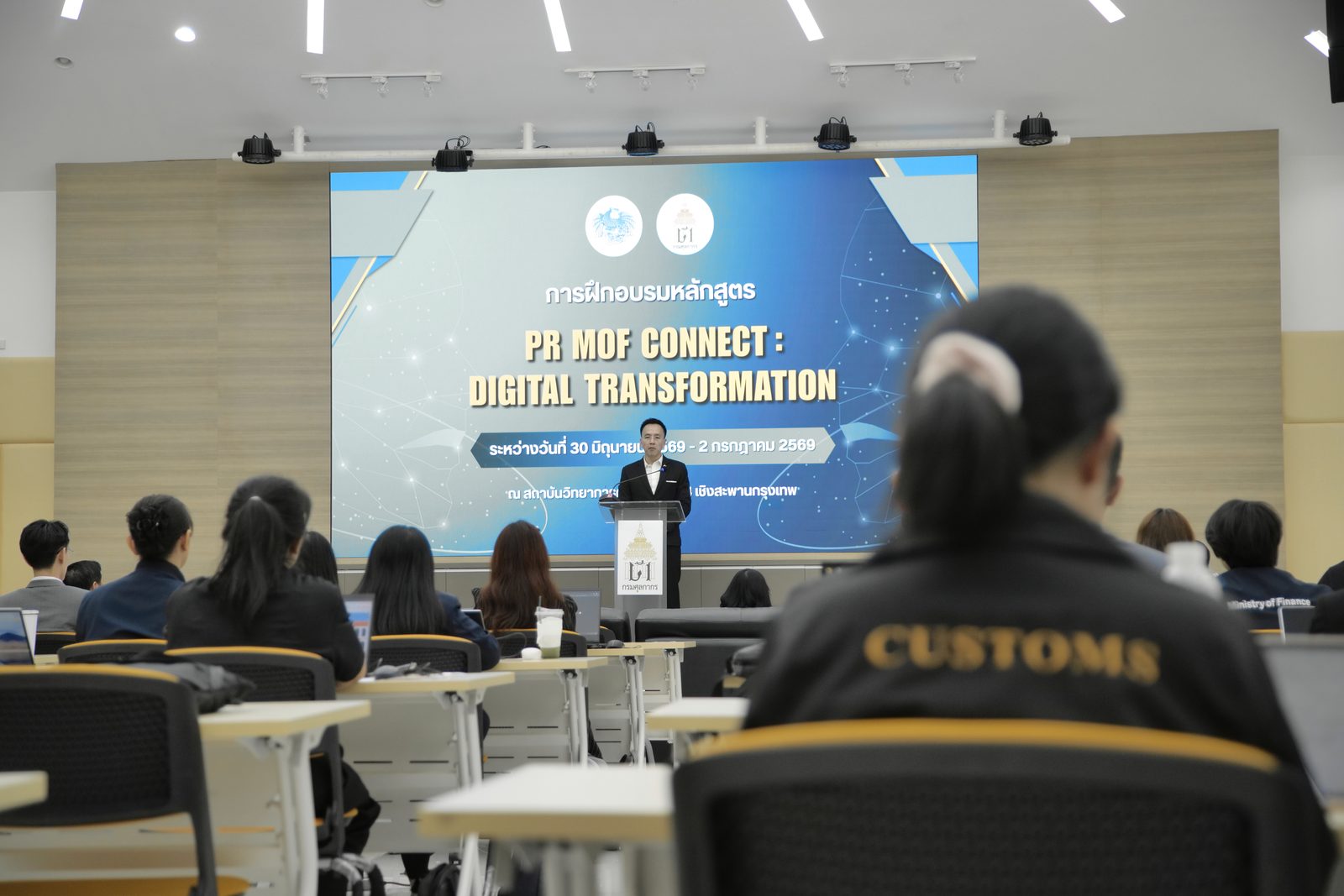
ทีมวิทยากรของเราให้บริการอบรม AI มาแล้วกว่า 100 องค์กรทั้งภาคเอกชนและภาครัฐ ผลงานล่าสุดคือเวิร์กชอป "PR MOF CONNECT: DIGITAL TRANSFORMATION" ให้ทีมงานจาก 9 หน่วยงานภาครัฐระดับประเทศ — เวิร์กชอปเข้มข้น 3 วันเต็มที่ผู้เรียนทุกคนสร้างผลงานด้วย AI ได้จริงก่อนกลับOur trainers have delivered AI programs to 100+ private and public organizations. Most recently, the "PR MOF CONNECT: DIGITAL TRANSFORMATION" workshop trained teams from 9 national government agencies — three intensive hands-on days where every participant produced real AI work before leaving.
มาตรฐานเดียวกันนี้คือสิ่งที่เรานำไปสู่ทีมที่ต้องทำงานนำเสนอในองค์กรของคุณ ไม่ว่าจะอบรมที่ออฟฟิศ ห้องประชุมโรงแรม หรือออนไลน์That same standard is what we bring to the people who present in your organization — at your office, a hotel meeting room, or online.
อ่านเคสระดับประเทศฉบับเต็ม พร้อมภาพบรรยากาศ 16 ภาพRead the full national case with 16 photosเมื่อไหร่ไม่ควรเรียนคอร์สนี้ และควรจ้างทำสไลด์แทนWhen is this course the wrong choice, and hiring someone the right one?
ถ้าเป็นงานครั้งเดียวที่เดิมพันสูงและเวลาน้อย เช่น เด็คระดมทุน งานเปิดตัวสินค้า หรือสไลด์ประชุมผู้ถือหุ้นที่ต้องเสร็จภายในสัปดาห์ การจ้างทีมทำให้คุ้มกว่าส่งคนมาเรียน คอร์สนี้เหมาะเมื่อทีมต้องทำสไลด์ซ้ำทุกเดือน และอยากทำเองให้เร็วขึ้นโดยคุณภาพไม่ตกIf it's a one-off, high-stakes job on a short deadline — a fundraising deck, a product launch, shareholder-meeting slides due this week — hiring a team pays off more than sending people to class. This course fits when your team builds slides every month and wants to do it faster themselves without losing quality.
- งานด่วนครั้งเดียวที่ต้องการดีไซน์เฉพาะ → ใช้ บริการรับทำพรีเซนเทชันและ PowerPoint ด้วย AI ให้ทีมเราทำให้An urgent one-off needing bespoke design → use our AI presentation and PowerPoint design service and let our team build it.
- คนในทีมยังไม่เคยใช้ AI เลย → เริ่มจาก หลักสูตร AI Literacy สำหรับพนักงาน หรือ คอร์ส ChatGPT ก่อนYour team has never used AI → start with AI Literacy for employees or the ChatGPT course first.
- งานหลักคือกราฟิกโซเชียลและภาพโฆษณา ไม่ใช่สไลด์ประชุม → คอร์ส Canva AI ตรงกว่าYour main work is social graphics and ad visuals rather than meeting slides → the Canva AI course is a closer fit.
- มีแค่หนึ่งหรือสองคนที่อยากลองเอง → อ่าน วิธีเขียน Prompt ให้ AI ตอบตรงใจ แล้วลองกับงานจริงก่อนก็พอ ยังไม่ต้องจัดอบรมOnly one or two people want to try it → reading how to write prompts that get the answer you want and practising on real work is enough for now; no training needed yet.
เลือกคอร์สทำสไลด์ด้วย AI ที่ไหนดี — เช็กลิสต์ 5 ข้อWhere to take an AI presentation course — a 5-point checklist
- ฝึกกับงานนำเสนอจริงและเทมเพลตจริงของบริษัท ไม่ใช่ตัวอย่างสำเร็จรูปPractises on your real presentations and real company template, not canned examples
- บอกชัดว่า AI ทำอะไร และอะไรที่คนต้องตรวจเอง โดยเฉพาะตัวเลขIs clear about what AI does and what people must check, especially numbers
- มีผลงานจริงกับองค์กร — AI Trainer Thailand จัดอบรม AI ให้แล้วกว่า 100 องค์กร รวมถึงผู้เข้าอบรมจาก 9 หน่วยงานภาครัฐ ด้วยหลักสูตรทั้งหมด 64 หลักสูตรA real track record — AI Trainer Thailand has delivered AI training to 100+ organizations, including participants from 9 government agencies, across 64 courses
- สอนเรื่องสิทธิ์การใช้ภาพและการใช้ข้อมูลบริษัทกับ AI อย่างปลอดภัยCovers image rights and using company data with AI safely
- ได้ชุดคำสั่งและเช็กลิสต์กลับไปใช้ต่อ พร้อมใบเสนอราคาฟรีภายใน 24 ชั่วโมงTake-home prompts and checklists, with a free quote within 24 hours
คำถามที่พบบ่อยFAQ
ต้องเก่ง PowerPoint หรือเคยใช้ AI มาก่อนไหมDo I need to be good at PowerPoint or have used AI before?
ไม่ต้อง ขอแค่ทำสไลด์พื้นฐานใน PowerPoint หรือ Google Slides ได้ หลักสูตรเริ่มจากการเขียนคำสั่งให้ AI แบบง่าย แล้วฝึกกับงานนำเสนอจริงของผู้เรียนเอง ส่วนคนที่ใช้ AI อยู่แล้วจะได้วิธีทำงานเป็นขั้นตอนและเทคนิคคุมเทมเพลตบริษัทเพิ่มNo. You only need to build basic slides in PowerPoint or Google Slides. The course starts with simple prompting and then practises on your own real presentations. People who already use AI gain a step-by-step workflow and techniques for keeping the company template intact.
คลาสใช้เครื่องมือ AI ตัวไหน ต้องมี Copilot หรือบัญชีแบบเสียเงินไหมWhich AI tools does the class use — do we need Copilot or paid accounts?
คลาสใช้ผู้ช่วย AI ทั่วไปสำหรับคิดสตอรีไลน์ ร่วมกับ PowerPoint และเครื่องมืออย่าง Gamma หรือ Canva โดยปรับตามที่องค์กรมีอยู่ ถ้าบริษัทมีสิทธิ์ใช้ Copilot ใน PowerPoint จะฝึกในนั้นด้วย ถ้าไม่มีก็ทำครบทุกขั้นได้ด้วยเครื่องมือที่บริษัทอนุมัติ ทีมงานแจ้งสิ่งที่ต้องเตรียมก่อนวันอบรมThe class uses a general AI assistant for storylines, together with PowerPoint and tools such as Gamma or Canva, adjusted to what your organization already has. If your company is licensed for Copilot in PowerPoint, we practise there too; if not, every step can be done with tools the company has approved. We'll tell you what to prepare before the day.
ใช้ AI ทำสไลด์แล้วเทมเพลตบริษัทจะเพี้ยนไหมWill using AI break our company template?
เพี้ยนได้ถ้าเริ่มจากเครื่องมือที่ใช้ดีไซน์ของตัวเองแล้วค่อยแปะลงไฟล์บริษัท ในคลาสจะฝึกให้เริ่มจากไฟล์เทมเพลตบริษัททุกครั้ง ใช้ AI กับเนื้อหา แล้ววางลงเลย์เอาต์ของ master slide และแก้ฟอนต์หรือสีที่ master slide เท่านั้น ผู้เรียนนำเทมเพลตจริงของบริษัทมาฝึกได้It can, if you start in a tool that applies its own design and then paste into the company file. In class you practise always starting from the company template, using AI on the content, placing it into the master slide's layouts, and changing fonts or colours only in the master. Participants can bring the company's real template to practise with.
เอาตัวเลขหรือข้อมูลลับของบริษัทใส่ AI เพื่อทำสไลด์ได้ไหมCan we put company figures or confidential data into AI to make slides?
ควรใช้เฉพาะเครื่องมือ AI ที่บริษัทอนุมัติ และตรวจเงื่อนไขการใช้ข้อมูลล่าสุดของผู้ให้บริการก่อนทุกครั้ง ในคลาสแนะนำให้ฝึกกับข้อมูลตัวอย่างหรือข้อมูลที่ตัดชื่อและส่วนลับออกแล้ว ให้ AI ช่วยเรื่องโครงเรื่องและถ้อยคำ ส่วนตัวเลขให้คำนวณจาก Excel ต้นทางแล้วใส่เองUse only AI tools your company has approved, and check the provider's current data terms first every time. In class we recommend practising with sample data or data with names and confidential parts removed. Let AI help with structure and wording, and calculate the figures from the source Excel file and enter them yourself.
ภาพที่ AI สร้างเอาไปใช้ในสไลด์งานบริษัทได้ไหมCan we use AI-generated images in company slides?
ใช้ได้ในหลายกรณี แต่ต้องดูเงื่อนไขการใช้งานของเครื่องมือที่ใช้สร้าง นโยบายของบริษัท และระวังภาพที่เลียนแบบโลโก้ ตัวการ์ตูน หรือบุคคลจริง ในคลาสมีหัวข้อเรื่องสิทธิ์การใช้ภาพ และแนะนำให้อ่านคู่มือลิขสิทธิ์งาน AI ในประเทศไทยประกอบIn many cases, yes — but check the generating tool's terms of use and your company policy, and be careful with images that imitate logos, cartoon characters or real people. The class covers image rights, and we recommend reading our guide to AI copyright in Thailand alongside it.
คอร์สนี้ต่างจากบริการรับทำพรีเซนเทชันของ AI Trainer Thailand ยังไงHow is this course different from AI Trainer Thailand's presentation design service?
คอร์สนี้สอนให้ทีมทำสไลด์ด้วย AI ได้เองทุกเดือน ส่วนบริการรับทำพรีเซนเทชันเหมาะกับงานสำคัญครั้งเดียวที่อยากให้ทีมออกแบบทำให้ หลายองค์กรใช้ทั้งสองแบบ คือจ้างทำเด็คที่เดิมพันสูง และส่งทีมมาเรียนเพื่อทำงานนำเสนอประจำได้เองThis course teaches your team to make slides with AI themselves, month after month. The presentation service suits an important one-off where you'd rather have our design team build it. Many organizations use both: they outsource the high-stakes deck and train the team to handle routine presentations in-house.
เรียนกี่วัน และปรับให้ตรงกับงานนำเสนอของทีมได้ไหมHow long is it, and can it be tailored to our team's presentations?
เป็นเวิร์กชอป 1 วัน ปรับเป็นครึ่งวันหรือแยกรุ่นตามแผนกได้ ทีมงานปรับโจทย์ตามงานจริง เช่น สไลด์รายงานประจำเดือน เด็คเสนอลูกค้า หรือข้อเสนอขออนุมัติโครงการ ผู้เรียนนำหัวข้อจริงของตัวเองมาทำในคลาสได้ และได้รับใบรับรองเมื่อจบหลักสูตรIt's a one-day workshop that can be shortened to half a day or split into batches by department. We tailor the exercises to real work such as monthly report slides, client decks or project approval proposals. Participants can bring their own real topics to work on in class, and receive a certificate on completion.
อบรมทำสไลด์ด้วย AI ราคาเท่าไหร่How much does AI presentation training cost?
ค่าอบรมขึ้นกับหลายปัจจัย ได้แก่The fee depends on several factors:
- จำนวนผู้เรียนNumber of participants
- รูปแบบ Onsite หรือ OnlineOnsite or Online format
- ครึ่งวันหรือเต็มวันHalf-day or full-day
- เครื่องมือที่ต้องสอน เช่น เฉพาะ PowerPoint หรือรวม Gamma และ CanvaWhich tools to cover, e.g. PowerPoint only, or Gamma and Canva as well
- การปรับโจทย์ให้ตรงกับเทมเพลตและงานจริงของทีมTailoring exercises to your template and real work
ขอใบเสนอราคาฟรีภายใน 24 ชั่วโมงGet a free quote within 24 hours.
หลักสูตร AI ที่เกี่ยวข้องRelated AI Courses
อบรม Microsoft Copilot สำหรับองค์กรMicrosoft Copilot for Organizations
ดูหลักสูตร →View course →คอร์ส Canva AICanva AI Course
ดูหลักสูตร →View course →คอร์ส Nano Banana Pro สร้างภาพด้วย AINano Banana Pro AI Image Course
ดูหลักสูตร →View course →อบรม AI กับ Excel วิเคราะห์ข้อมูลAI with Excel for Data Analysis
ดูหลักสูตร →View course →หลักสูตร AI สำหรับผู้บริหารAI for Executives
ดูหลักสูตร →View course →บริการรับทำพรีเซนเทชันด้วย AIAI Presentation Design Service
ดูบริการ →View service →สนใจหลักสูตรนี้สำหรับทีมของคุณ?Interested in This Course for Your Team?
ปรึกษาฟรี ไม่มีข้อผูกมัด — ปรับโจทย์ให้ตรงกับเทมเพลตและงานนำเสนอจริงของทีมคุณ พร้อมใบเสนอราคาภายใน 24 ชั่วโมงFree consultation, no strings attached — exercises tailored to your template and your team's real presentations, quote within 24 hours.
ปรึกษาฟรี / ขอใบเสนอราคาFree Consultation / Get a Quote