อบรม AI สำหรับเลขานุการและผู้ช่วยผู้บริหารAI Training for Secretaries and Executive Assistants
อัปเดตล่าสุด 2026-10-15Last updated 2026-10-15
ทำรายงานการประชุม สรุปเอกสาร และร่างอีเมลไทย-อังกฤษได้เร็วขึ้น โดยความลับของผู้บริหารยังอยู่ในมือคุณFaster minutes, briefs and Thai-English email, while the executive's confidential information stays in your hands
งานของเลขานุการและผู้ช่วยผู้บริหารคือทำให้ผู้บริหารพร้อมตลอดเวลา ตั้งแต่จดและเวียนรายงานการประชุม ย่อเอกสารประกอบวาระหนาหลายสิบหน้าให้เหลือหน้าเดียว ตอบอีเมลในนามผู้บริหารด้วยน้ำเสียงที่ถูกต้อง ไปจนถึงจัดตารางนัดและกำหนดการเดินทาง งานเหล่านี้มาพร้อมกันทุกวันและพลาดไม่ได้ หลักสูตรนี้สอนให้ใช้ AI ช่วยร่างงานเหล่านี้อย่างเป็นขั้นตอน และสอนเรื่องที่สำคัญกว่าความเร็ว คือรู้ว่าข้อมูลไหนห้ามใส่ใน AI และงานทุกชิ้นต้องตรวจอะไรก่อนถึงมือผู้บริหารA secretary's or executive assistant's job is to keep the executive ready at all times: taking and circulating minutes, cutting a pre-read of dozens of pages down to one, answering email on the executive's behalf in the right tone, and planning schedules and travel. It all lands at once, every day, and none of it can go wrong. This course teaches a step-by-step way to use AI to draft that work, and something that matters more than speed: knowing which information must never go into AI, and what to check in every piece of work before it reaches the executive.
สรุปสั้นTL;DR
หลักสูตร AI สำหรับเลขานุการและผู้ช่วยผู้บริหาร คือเวิร์กชอปภาคปฏิบัติ 1 วัน (ปรับได้) โดย AI Trainer Thailand ที่สอนให้เลขาใช้ AI ทำรายงานการประชุมที่แยกมติ งานที่ต้องทำ ผู้รับผิดชอบ และกำหนดส่ง สรุปเอกสารยาวเป็นชุดบรีฟให้ผู้บริหาร ร่างอีเมลธุรกิจไทย-อังกฤษ เตรียมประเด็นพูด และจัดคลังพรอมต์ของตัวเอง โดยกฎข้อแรกคือ ข้อมูลลับของผู้บริหาร เรื่องในวาระกรรมการ และเรื่องบุคคล ห้ามใส่ในเครื่องมือ AI สาธารณะ ใช้เฉพาะเครื่องมือที่องค์กรอนุมัติ AI Trainer Thailand จัดอบรม AI ให้แล้วกว่า 100 องค์กร รวมถึงผู้เข้าอบรมจาก 9 หน่วยงานภาครัฐ ด้วยหลักสูตรทั้งหมด 64 หลักสูตร จัดได้ทั้งแบบ Onsite ทั่วประเทศและออนไลน์ มีใบรับรอง ปรึกษาและขอใบเสนอราคาฟรีภายใน 24 ชั่วโมงAI for Secretaries and Executive Assistants is a hands-on one-day (flexible) workshop by AI Trainer Thailand that teaches secretaries to use AI for minutes that separate decisions, action items, owners and due dates; to turn long documents into executive briefs; to draft Thai and English business email; to prepare talking points; and to keep a personal prompt library. The first rule: the executive's confidential information, board matters and personnel cases never go into a public AI tool, and only organisation-approved tools are used. AI Trainer Thailand has delivered AI training to 100+ organizations, including participants from 9 government agencies, across 64 courses. It runs onsite nationwide or online, includes a certificate, with free consultation and a quote within 24 hours.
เลขานุการใช้ AI ช่วยงานอะไรได้บ้างWhat can secretaries use AI for?
เลขานุการใช้ AI เป็นผู้ช่วยร่างงานได้เกือบทุกชิ้น ทั้งรายงานการประชุมจากโน้ตหรือไฟล์เสียงที่ผู้เข้าประชุมยินยอมให้บันทึก สรุปเอกสารยาวเป็นชุดบรีฟ ร่างและเกลาอีเมลไทย-อังกฤษ ร่างตารางนัดและกำหนดการเดินทาง จัดรูปแบบจดหมาย และเตรียมประเด็นพูด โดยเลขาเป็นคนตรวจ แก้ และตัดสินใจขั้นสุดท้ายเสมอSecretaries can use AI as a drafting assistant for almost every task: minutes from notes or from recordings the attendees agreed to, turning long documents into briefs, drafting and polishing Thai and English email, drafting schedules and travel itineraries, formatting letters, and preparing talking points, with the secretary always checking, editing and making the final call.
สิ่งที่ AI ทำแทนไม่ได้คือการตัดสินว่าใครควรรู้อะไร การยืนยันชื่อ ตัวเลข และวันเวลา และการส่งอะไรออกไปในนามผู้บริหารโดยไม่มีคนอ่าน ถ้าองค์กรใช้ Microsoft 365 อยู่แล้ว งานส่วนใหญ่ในหน้านี้ทำได้ใน Outlook, Word และ Teams ผ่าน Copilot (ดู คอร์ส Microsoft Copilot สำหรับองค์กร) ถ้าใช้ Google Workspace ก็ทำได้ผ่าน Gemini (ดู คอร์ส Google Gemini) ส่วนวิธีเลือกเครื่องมือสรุปประชุมแต่ละแบบ เราเขียนเทียบไว้ใน บทความ AI สรุปประชุม ใช้แบบไหนดีWhat AI cannot do for you is decide who should know what, confirm names, figures, dates and times, or send anything in the executive's name without a person reading it first. If your organisation already runs Microsoft 365, most of the work on this page can be done in Outlook, Word and Teams through Copilot (see the Microsoft Copilot for organisations course); on Google Workspace the same work runs through Gemini, as in the Google Gemini course. For how the different meeting-summary tools compare, see our article AI meeting notes: which approach to use.
ใช้ AI แล้วงานเลขาเปลี่ยนไปยังไง และอะไรที่คนต้องตรวจเองHow does AI change a secretary's work, and what must a person still check?
AI ทำให้ได้ร่างแรกเร็วขึ้นมาก แต่ไม่ได้ทำให้งานตรวจหายไป ตารางด้านล่างเทียบงานหลักของเลขา วิธีทำแบบเดิม สิ่งที่ AI ช่วยได้ และจุดที่คนต้องตรวจเองทุกครั้ง เพราะความผิดพลาดในงานเลขามักอยู่ที่ชื่อ ตัวเลข วันเวลา และน้ำเสียง ซึ่งเป็นจุดที่ AI พลาดได้บ่อยที่สุดAI gets you to a first draft much faster, but it does not remove the checking. The table below compares a secretary's core tasks, how they are done today, what AI can help with, and what a person must check every time, because mistakes in secretarial work tend to sit in names, figures, dates and tone, which is exactly where AI slips most often.
| งานTask | แบบเดิมBefore | ใช้ AI ช่วยWith AI | สิ่งที่คนต้องตรวจเองWhat a person must check |
|---|---|---|---|
| รายงานการประชุมMeeting minutes | ฟังเทปซ้ำหลายรอบ พิมพ์ใหม่ทั้งฉบับReplay the recording, retype the whole thing | ร่างจากโน้ตหรือบันทึกถอดเสียง แยกมติ งาน ผู้รับผิดชอบ กำหนดส่งDraft from notes or a transcript, separating decisions, actions, owners, due dates | ชื่อ ตัวเลข มติที่ตกลงกันจริง และเรื่องที่ขอไม่ให้บันทึกNames, figures, what was actually agreed, and anything said off the record |
| วาระและชุดบรีฟก่อนประชุมAgenda and pre-meeting brief | อ่านเอกสารทั้งชุดแล้วสรุปเองRead the whole pack and summarise by hand | ย่อเป็นหน้าเดียว แยกเรื่องที่ต้องตัดสินใจ และคำถามที่ควรถามCut to one page, flag decisions needed and questions worth asking | ตัวเลขตรงกับต้นฉบับ ไม่มีประเด็นสำคัญหล่นหายFigures match the source, nothing important dropped |
| อีเมลไทย-อังกฤษThai and English email | ร่างเอง เสียเวลาเลือกคำ โดยเฉพาะภาษาอังกฤษDraft by hand, time lost choosing words, especially in English | ร่างและปรับน้ำเสียงให้เข้ากับกรรมการ คู่ค้า หรือหน่วยงานราชการDraft and adjust tone for board members, partners or government contacts | ข้อเท็จจริง คำมั่นสัญญา ชื่อและตำแหน่งผู้รับ และผู้บริหารเห็นชอบก่อนส่งFacts, commitments, recipient names and titles, and the executive's approval |
| ตารางนัดและกำหนดการเดินทางSchedules and itineraries | เทียบปฏิทินหลายคน พิมพ์กำหนดการเองCompare several calendars, type the itinerary by hand | ร่างกำหนดการเป็นข้อความ เผื่อเวลาเดินทาง ทำฉบับย่อให้ผู้บริหารDraft the itinerary text, add travel buffers, make a short version for the executive | เวลา เขตเวลา เที่ยวบิน ที่อยู่ ต้องตรวจกับต้นทางจริงTimes, time zones, flights and addresses, checked against the real source |
| จดหมายและเอกสารทางการLetters and formal documents | แก้รูปแบบทีละฉบับFix formatting one document at a time | จัดรูปแบบ ปรับภาษาให้เป็นทางการ ทำเทมเพลตใช้ซ้ำFormat, make the language formal, build reusable templates | แบบฟอร์มขององค์กร คำขึ้นต้น-ลงท้าย ยศ และตำแหน่งThe organisation's format, salutations and closings, ranks and titles |
| สุนทรพจน์และประเด็นพูดSpeeches and talking points | เขียนจากหน้าว่างWrite from a blank page | ร่างโครง ประเด็นพูด และฉบับสั้น-ยาวตามเวลาที่ได้Outline, talking points, and short or long versions to fit the slot | ข้อเท็จจริง ชื่อคนที่จะกล่าวถึง และสไตล์การพูดของผู้บริหารFacts, names of people mentioned, and the executive's speaking style |
| คลังพรอมต์ส่วนตัวPersonal prompt library | เขียนคำสั่งใหม่ทุกครั้งWrite a new instruction every time | เก็บพรอมต์ที่ได้ผลเป็นชุด เรียกใช้ซ้ำได้ทันทีKeep prompts that work as a set, reuse them instantly | ไม่มีข้อมูลลับค้างอยู่ในพรอมต์ที่บันทึกไว้No confidential details left inside saved prompts |
สิ่งที่คุณจะได้เรียนWhat You'll Learn
- พื้นฐานการเขียนพรอมต์สำหรับงานเลขา พร้อมกฎความลับข้อแรกPrompt basics for secretarial work, with confidentiality as rule one
- ทำรายงานการประชุมจากโน้ตหรือบันทึกถอดเสียง แยกมติ งาน ผู้รับผิดชอบ และกำหนดส่งMinutes from notes or transcripts, with decisions, actions, owners and due dates
- ย่อเอกสารยาวเป็นชุดบรีฟหน้าเดียว และร่างวาระการประชุมTurn long documents into a one-page brief and draft the agenda
- ร่างและเกลาอีเมลไทย-อังกฤษ ปรับน้ำเสียงตามผู้รับDraft and polish Thai and English email, matching tone to the recipient
- ร่างตารางนัด กำหนดการเดินทาง และข้อความยืนยันนัดDraft schedules, travel itineraries and appointment confirmations
- จัดรูปแบบจดหมายและเอกสาร พร้อมเทมเพลตที่ใช้ซ้ำได้Format letters and documents, with reusable templates
- เตรียมคำกล่าว สุนทรพจน์ และประเด็นพูดของผู้บริหารPrepare remarks, speeches and talking points for the executive
- สร้างคลังพรอมต์ส่วนตัว และแยกข้อมูลที่ห้ามใส่ใน AI ออกให้ชัดBuild a personal prompt library and keep off-limits information out of it
ตัวอย่างกำหนดการเวิร์กชอป 1 วันSample One-Day Workshop Agenda
กำหนดการด้านล่างเรียงตามงานที่เลขาเจอจริงในหนึ่งสัปดาห์ เริ่มจากกติกาความลับ แล้วลงมือทำรายงานการประชุม ชุดบรีฟ อีเมล และคำกล่าว จนจบวันด้วยคลังพรอมต์ของตัวเองที่นำกลับไปใช้ได้ทันทีThe schedule below follows the work a secretary meets in a typical week: it starts with the confidentiality rules, moves through minutes, briefs, email and speeches, and ends with a personal prompt library you can use the next morning.
10:15
เปิดเวิร์กชอป พื้นฐานพรอมต์ และกฎความลับข้อแรกKickoff, Prompt Basics and the First Rule of Confidentiality
วางกติกาก่อนลงมือ ว่าข้อมูลระดับไหนใส่เครื่องมือไหนได้ และใช้เฉพาะเครื่องมือที่องค์กรอนุมัติ จากนั้นฝึกเขียนพรอมต์ที่บอกบทบาท บริบท และรูปแบบผลลัพธ์ให้ชัดSet the rules before touching a tool: which level of information may go into which tool, and only organisation-approved tools. Then practise prompts that state the role, the context and the output format clearly.
12:00
รายงานการประชุมที่เวียนได้จริงMinutes You Can Actually Circulate
ฝึกจากโน้ตและบันทึกถอดเสียงตัวอย่าง ให้ AI แยกมติ งานที่ต้องทำ ผู้รับผิดชอบ กำหนดส่ง และคำถามที่ยังค้าง แล้วฝึกตรวจชื่อ ตัวเลข และคำมั่นสัญญาก่อนเวียนWork from sample notes and transcripts: have AI separate decisions, action items, owners, due dates and open questions, then practise checking names, figures and commitments before circulating.
14:15
ชุดบรีฟและวาระสำหรับผู้บริหารExecutive Briefs and Agendas
ย่อรายงานยาวให้เหลือหน้าเดียว แยกเรื่องที่ผู้บริหารต้องตัดสินใจออกจากเรื่องที่แค่รับทราบ ร่างวาระ และตรวจตัวเลขกับเอกสารต้นฉบับCut a long report to one page, separate what the executive must decide from what is for information only, draft the agenda, and check the figures against the source.
15:30
อีเมลไทย-อังกฤษ จดหมาย และกำหนดการThai-English Email, Letters and Itineraries
ร่างอีเมลถึงกรรมการ คู่ค้า และหน่วยงานราชการ ปรับน้ำเสียงให้เหมาะกับแต่ละกลุ่ม จัดรูปแบบจดหมายตามแบบขององค์กร และร่างกำหนดการเดินทางที่ผู้บริหารอ่านจบในครึ่งนาทีDraft email to board members, partners and government contacts with the right tone for each, format letters to the organisation's style, and draft an itinerary the executive can read in half a minute.
16:30
คำกล่าว สุนทรพจน์ และประเด็นพูดRemarks, Speeches and Talking Points
ร่างคำกล่าวเปิดงานให้พอดีกับเวลาที่ได้ ทำ talking points สำหรับการประชุมสำคัญ และเตรียมคำถามที่ผู้บริหารอาจถูกถาม พร้อมคำตอบสั้น ๆDraft opening remarks that fit the time slot, prepare talking points for a key meeting, and list the questions the executive may face with short answers.
17:00
คลังพรอมต์ส่วนตัว & แผนใช้งานต่อPersonal Prompt Library & Rollout Plan
รวมพรอมต์ที่ได้ผลตลอดวันเป็นคลังที่จัดหมวดแล้ว ตัดข้อมูลลับออก และร่างข้อตกลงกับผู้บริหารว่างานแบบไหนให้ AI ช่วยร่างได้ งานแบบไหนต้องทำเองGather the day's working prompts into an organised library with confidential details removed, and draft an agreement with the executive on which work AI may help draft and which stays manual.
กำหนดการเป็นตัวอย่าง ปรับให้เข้ากับเครื่องมือและงานจริงขององค์กรคุณได้This agenda is a sample and can be adjusted to your organisation's tools and real work.
ข้อมูลอะไรของผู้บริหารที่ห้ามใส่ใน AI — เช็กลิสต์ความลับ 8 ข้อWhat executive information must never go into AI? An 8-point confidentiality checklist
กฎข้อแรกของเลขาที่ใช้ AI คือ ข้อมูลลับของผู้บริหาร เรื่องในวาระกรรมการ และเรื่องบุคคล ห้ามใส่ในเครื่องมือ AI สาธารณะหรือบัญชีส่วนตัว ใช้ได้เฉพาะเครื่องมือที่องค์กรอนุมัติ และตามระดับชั้นความลับที่องค์กรกำหนด ถ้าไม่แน่ใจว่าเรื่องไหนลับแค่ไหน ให้ถือว่าห้ามไว้ก่อน แล้วถามผู้บริหารหรือฝ่ายไอทีThe first rule for a secretary using AI: the executive's confidential information, board matters and personnel cases never go into a public AI tool or a personal account. Use only organisation-approved tools, and only at the confidentiality level the organisation allows. If you are not sure how sensitive something is, treat it as off-limits and ask the executive or IT.
- 1เรื่องในวาระคณะกรรมการ มติที่ยังไม่เปิดเผย และตัวเลขทางการเงินก่อนประกาศ ไม่ใส่ในเครื่องมือสาธารณะไม่ว่ากรณีใดBoard matters, undisclosed resolutions and financial figures before announcement never go into a public tool, under any circumstances.
- 2เรื่องบุคคล เช่น การสอบสวน การลงโทษ การเลิกจ้าง เงินเดือน ผลประเมิน และเรื่องร้องเรียนPersonnel cases such as investigations, disciplinary action, terminations, salaries, appraisals and complaints.
- 3ดีลที่ยังไม่ประกาศ การลงทุน การควบรวม การเจรจากับคู่ค้า และราคาที่ยังไม่ตกลงUnannounced deals: investments, mergers, partner negotiations and prices not yet agreed.
- 4ข้อมูลส่วนตัวของผู้บริหารและครอบครัว ที่อยู่ เลขบัตร ข้อมูลสุขภาพ และตารางเดินทางส่วนตัว ซึ่งเป็นเรื่องความปลอดภัยด้วยPersonal data of the executive and family: addresses, ID numbers, health information and private travel plans, which are also a security matter.
- 5รหัสผ่าน ลิงก์เข้าระบบ และเลขบัญชี ไม่ใส่ในเครื่องมือ AI ใดเลย แม้เป็นเครื่องมือขององค์กรPasswords, sign-in links and account numbers go into no AI tool at all, not even the organisation's own.
- 6ใช้บัญชีองค์กรที่ฝ่ายไอทีอนุมัติ ไม่ใช้บัญชีส่วนตัว และอ่านเงื่อนไขการใช้ข้อมูลของผู้ให้บริการฉบับปัจจุบัน ว่าข้อมูลที่ใส่ไปถูกนำไปใช้อย่างไรUse the IT-approved organisation account, never a personal one, and read the provider's current data-use terms to know how what you enter is handled.
- 7แทนชื่อและตัวเลขอ่อนไหวด้วยตัวแปร เช่น "บริษัท A" หรือ "ผู้บริหาร X" ก่อนให้ AI ช่วยเรียบเรียง แล้วค่อยใส่กลับตอนตรวจSwap sensitive names and figures for placeholders such as "Company A" or "Executive X" before asking AI to rework a text, and put them back when you check.
- 8ทุกอย่างที่ส่งในนามผู้บริหารต้องมีคนอ่านก่อน ไม่ตั้งให้ AI ส่งอีเมลหรือเวียนรายงานเองEverything sent in the executive's name is read by a person first. Never let AI send email or circulate minutes on its own.
เลขาคือคนที่มิจฉาชีพเลือกโทรหาSecretaries are the people scammers choose to call
กลโกงที่ใช้ AI ปลอมเสียงผู้บริหาร แล้วโทรหรือส่งข้อความสั่งให้โอนเงินด่วนหรือส่งเอกสารลับ มักพุ่งเป้าที่เลขาและผู้ช่วยผู้บริหาร เพราะเป็นคนที่ทำตามคำสั่งผู้บริหารเป็นประจำ ในคลาสเราซ้อมหลักง่าย ๆ ข้อเดียว คือคำสั่งเรื่องเงินหรือข้อมูลลับต้องยืนยันผ่านช่องทางที่ตกลงกันไว้ก่อนเสมอ ไม่ว่าเสียงจะเหมือนแค่ไหน อ่านขั้นตอนเต็มได้ใน คู่มือรับมือ "เสียงเจ้านาย" สั่งโอนเงินด่วน และถ้าองค์กรยังไม่มีกติกาการใช้ AI กับข้อมูลบริษัท เริ่มได้จาก ใช้ AI ยังไงไม่ให้ข้อมูลบริษัทรั่วScams that use AI to clone an executive's voice, then call or message with an urgent order to transfer money or send confidential files, tend to target secretaries and executive assistants, because they routinely act on the executive's instructions. In class we rehearse one simple rule: any instruction about money or confidential information is confirmed through a pre-agreed channel first, however real the voice sounds. The full procedure is in our guide when a "boss voice" orders an urgent transfer, and if your organisation has no rules yet for using AI with company data, start with using AI without leaking company data.
หลักสูตรนี้เหมาะกับใครWho Should Attend
ถ้าผู้บริหารอยากเข้าใจว่า AI ช่วยการตัดสินใจและงานของตัวเองได้แค่ไหน ควรเรียน หลักสูตร AI สำหรับผู้บริหาร คู่กัน เพื่อให้ตกลงกติกากับเลขาได้ง่ายขึ้น ส่วนทีมที่งานหลักเป็นเอกสารบุคคลและงานธุรการทั่วไป หลักสูตร AI สำหรับทีม HR และธุรการ จะตรงกว่าIf the executive wants to understand how far AI can support their own decisions and work, the AI course for executives pairs well with this one and makes it easier to agree working rules with the secretary. For teams whose main work is personnel documents and general administration, the AI for HR and Admin course is a closer fit.
ผลลัพธ์ที่คุณจะได้กลับไปWhat You'll Walk Away With
เทมเพลตรายงานการประชุม พร้อมพรอมต์ที่แยกมติ งาน ผู้รับผิดชอบ และกำหนดส่งA minutes template with a prompt that separates decisions, actions, owners and due dates
ชุดพรอมต์อีเมลไทย-อังกฤษ แยกตามกลุ่มผู้รับ ทั้งกรรมการ คู่ค้า และหน่วยงานราชการA set of Thai and English email prompts by recipient group: board, partners and government contacts
เช็กลิสต์ความลับและขั้นตอนตรวจก่อนส่ง ที่ตกลงกับผู้บริหารได้ทันทีA confidentiality checklist and pre-send review steps you can agree with the executive straight away
คลังพรอมต์ส่วนตัวที่จัดหมวดแล้ว สำหรับงานที่ทำซ้ำทุกสัปดาห์An organised personal prompt library for the work you repeat every week
ตัวอย่างการใช้งานจริงหลังอบรมHow Secretarial Teams Apply This After the Workshop
สามตัวอย่างด้านล่างเป็นสถานการณ์ที่ทีมเลขาเจอเป็นประจำ และภาพการทำงานที่เปลี่ยนไปเมื่อนำวิธีจากคลาสไปใช้The three examples below are situations secretarial teams meet all the time, and how the work changes once they apply what they practised in class.
เลขาคณะกรรมการที่ต้องทำรายงานการประชุมยาวทุกเดือนA board secretary producing long minutes every month
เดิมต้องฟังเสียงประชุมย้อนหลังหลายชั่วโมงแล้วพิมพ์ใหม่ทั้งฉบับ หลังอบรม เลขาแจ้งที่ประชุมตั้งแต่ต้นว่าจะบันทึกเพื่อทำรายงาน ใช้เครื่องมือถอดเสียงที่องค์กรอนุมัติ แล้วใช้พรอมต์ที่ทำไว้ให้ AI ร่างรายงานแยกมติ งาน ผู้รับผิดชอบ และกำหนดส่ง โดยทำเครื่องหมายจุดที่ไม่แน่ใจ เลขาไล่ตรวจชื่อและตัวเลขกับโน้ตของตัวเอง ส่งให้ประธานเห็นชอบก่อนเวียน วาระที่ประธานสั่งงดบันทึกยังจดด้วยมือเหมือนเดิมPreviously this meant replaying hours of audio and retyping everything. After the workshop, the secretary tells the meeting at the start that it will be recorded for the minutes, uses the organisation-approved transcription tool, and runs a saved prompt so AI drafts minutes that separate decisions, actions, owners and due dates, flagging anything uncertain. The secretary checks names and figures against their own notes and sends the draft to the chair for approval before circulating. Items the chair asks not to record are still noted by hand.
ผู้ช่วยผู้บริหารที่ตอบอีเมลภาษาอังกฤษถึงคู่ค้าต่างประเทศทุกวันAn executive assistant answering English email to overseas partners every day
อีเมลถึงคู่ค้าต้องสุภาพแต่ไม่อ้อมจนอ่านไม่รู้เรื่อง และห้ามรับปากเกินที่ผู้บริหารตกลง หลังอบรม ผู้ช่วยมีพรอมต์แยกตามประเภทผู้รับ ใส่บริบทความสัมพันธ์และสิ่งที่ผู้บริหารอนุมัติไว้แล้ว ให้ AI ร่างสองแบบเพื่อเลือก แล้วตรวจข้อเท็จจริงและคำมั่นสัญญาก่อนส่งให้ผู้บริหารกดยืนยัน ไม่ต้องเริ่มจากหน้าว่างทุกฉบับEmail to partners must be courteous without being so indirect it loses the point, and must never promise more than the executive agreed. After the workshop, the assistant keeps a prompt per recipient type, adds the relationship context and what the executive has already approved, has AI draft two versions to choose from, then checks facts and commitments before the executive confirms. No more starting every email from a blank page.
เลขาที่ต้องเตรียมชุดบรีฟก่อนประชุมผู้บริหารทุกสัปดาห์A secretary preparing a brief before every weekly management meeting
เอกสารประกอบวาระมาจากหลายฝ่าย บางฉบับหนาหลายสิบหน้า ผู้บริหารไม่มีเวลาอ่านทั้งหมด หลังอบรม เลขาใช้เครื่องมือที่องค์กรอนุมัติย่อแต่ละเรื่องเป็นหน้าเดียว แยกเรื่องที่ต้องตัดสินใจ เรื่องที่รับทราบ และคำถามที่ควรถามเจ้าของเรื่อง แล้วเทียบตัวเลขทุกตัวกับต้นฉบับก่อนส่ง ถ้าเอกสารชุดใหญ่ ใช้วิธีจาก คอร์ส NotebookLM ถามตอบจากเอกสารชุดนั้นโดยตรง และใช้ คอร์สทำสไลด์ด้วย AI เมื่อต้องแปลงบรีฟเป็นสไลด์The papers for each item come from several departments, some dozens of pages long, and the executive has no time to read them all. After the workshop, the secretary uses an organisation-approved tool to reduce each item to one page, separating decisions, items for information and questions to ask the item owner, then checks every figure against the source before sending. For large document sets, the approach from the NotebookLM course lets you question the documents directly, and the AI presentation course helps when a brief has to become slides.
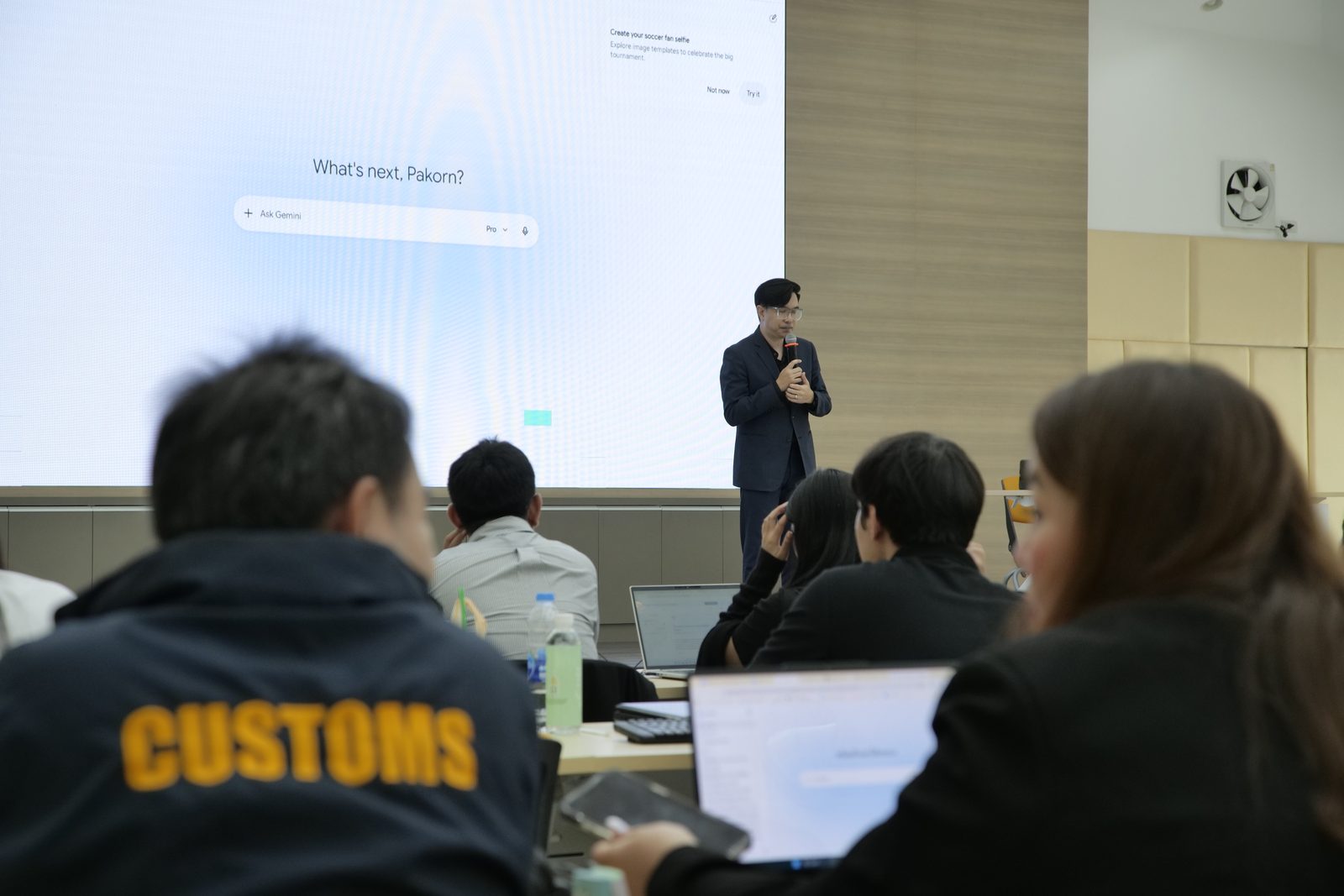
สอนโดยทีมที่มีผลงานอบรมระดับประเทศTaught by a Team With a National Track Record
ทีมวิทยากรของเราให้บริการอบรม AI มาแล้วกว่า 100 องค์กรทั้งภาคเอกชนและภาครัฐ ผลงานล่าสุดคือเวิร์กชอป "PR MOF CONNECT: DIGITAL TRANSFORMATION" ให้ทีมงานจาก 9 หน่วยงานภาครัฐระดับประเทศ — เวิร์กชอปเข้มข้น 3 วันเต็มที่ผู้เรียนทุกคนสร้างผลงานด้วย AI ได้จริงก่อนกลับOur trainers have delivered AI programs to 100+ private and public organizations. Most recently, the "PR MOF CONNECT: DIGITAL TRANSFORMATION" workshop trained teams from 9 national government agencies — three intensive hands-on days where every participant produced real AI work before leaving.
มาตรฐานเดียวกันนี้คือสิ่งที่เรานำไปสู่ทีมเลขานุการและผู้ช่วยผู้บริหารขององค์กรคุณ ไม่ว่าจะอบรมที่บริษัทหรือออนไลน์That same standard is what we bring to your secretaries and executive assistants — at your premises or online.
อ่านเคสระดับประเทศฉบับเต็ม พร้อมภาพบรรยากาศ 16 ภาพRead the full national case with 16 photosเมื่อไหร่ที่ยังไม่ต้องอบรมหลักสูตรนี้When you don't need this course yet
หลักสูตรนี้คุ้มเมื่อองค์กรรู้แล้วว่าเลขาใช้เครื่องมือไหนได้ และมีงานเอกสารของผู้บริหารมากพอที่จะเห็นผล ถ้ายังไม่ถึงจุดนั้น มีทางที่ง่ายหรือประหยัดกว่า และเราจะบอกตรง ๆ ตั้งแต่คุยครั้งแรกThis course pays off when the organisation already knows which tools its secretaries may use and has enough executive paperwork for the change to show. If you are not there yet, there is a simpler or cheaper route, and we will say so in the first conversation.
- องค์กรยังไม่ได้ตัดสินว่าใช้เครื่องมือ AI ตัวไหนได้ — เรียนไปแล้วกลับไปใช้ไม่ได้ ควรเริ่มจากวางกติกาการใช้ AI กับข้อมูลบริษัทก่อน ตามแนวทางใน ใช้ AI ยังไงไม่ให้ข้อมูลบริษัทรั่วThe organisation hasn't decided which AI tools are allowed — people would learn skills they can't use. Start by setting rules for AI and company data, as described in using AI without leaking company data.
- มีเลขาแค่หนึ่งหรือสองคนที่ใช้ AI คล่องอยู่แล้ว — บทความ AI สรุปประชุม กับ วิธีเขียน Prompt ให้ AI ตอบตรงใจ อาจพอแล้ว ไม่ต้องจัดอบรมYou have only one or two secretaries who already use AI confidently — our articles on AI meeting notes and writing prompts that work may be enough, with no training needed.
- ทั้งองค์กรยังไม่เคยใช้ AI เลย — เริ่มจากหลักสูตรพื้นฐานสำหรับทุกคนอย่าง AI Literacy สำหรับพนักงาน แล้วค่อยต่อยอดเฉพาะทีมเลขาNobody in the organisation uses AI yet — start with a foundation course for everyone, such as AI Literacy for employees, then add a secretarial module later.
- โจทย์จริงคืออยากให้ทุกฝ่ายใช้ Copilot ใน Microsoft 365 — คอร์ส Microsoft Copilot สำหรับทั้งองค์กรตรงกว่า แล้วเสริมช่วงงานเลขาเข้าไปได้The real goal is Copilot across every department in Microsoft 365 — the organisation-wide Microsoft Copilot course fits better, with a secretarial segment added.
- นโยบายห้ามใช้ AI กับเอกสารภายในทุกชนิด — การอบรมเครื่องมือไม่ช่วยอะไร ควรคุยเรื่องนโยบายกับผู้บริหารก่อนPolicy bans AI on every kind of internal document — tool training won't help; the policy conversation with leadership comes first.
เลือกคอร์ส AI สำหรับเลขานุการยังไง — เช็กลิสต์ 5 ข้อHow to choose an AI course for secretaries — a 5-point checklist
คอร์สที่ดีสำหรับเลขาต้องฝึกกับงานจริงของตำแหน่งนี้ และสอนเรื่องความลับก่อนสอนเรื่องความเร็ว ใช้ห้าข้อด้านล่างเทียบหลักสูตรที่คุณกำลังพิจารณา ไม่ว่าจะเป็นของเราหรือของผู้สอนรายอื่นA good course for secretaries practises on the real work of the role and teaches confidentiality before speed. Use the five points below to compare any course you are considering, ours or anyone else's.
- ฝึกกับงานเลขาจริง ทั้งรายงานการประชุม ชุดบรีฟ และอีเมล ไม่ใช่ตัวอย่างทั่วไปPractises on real secretarial work (minutes, briefs, email), not generic examples
- สอนกฎความลับและการใช้เครื่องมือที่องค์กรอนุมัติตั้งแต่ชั่วโมงแรกCovers confidentiality and organisation-approved tools from the first hour
- ปรับตามเครื่องมือที่องค์กรมีอยู่ ไม่บังคับให้ซื้อเครื่องมือใหม่Adapts to the tools you already have, without pushing you to buy new ones
- มีผลงานจริงกับองค์กร — AI Trainer Thailand จัดอบรม AI ให้แล้วกว่า 100 องค์กร รวมถึงผู้เข้าอบรมจาก 9 หน่วยงานภาครัฐ ด้วยหลักสูตรทั้งหมด 64 หลักสูตรA real track record — AI Trainer Thailand has delivered AI training to 100+ organizations, including participants from 9 government agencies, across 64 courses
- ได้เทมเพลตและคลังพรอมต์กลับไปใช้ต่อ พร้อมใบเสนอราคาฟรีภายใน 24 ชั่วโมงTake-home templates and a prompt library, with a free quote within 24 hours
คำถามที่พบบ่อยFAQ
ต้องมีพื้นฐานการใช้ AI มาก่อนไหมDo we need prior AI experience?
ไม่จำเป็น หลักสูตรเริ่มจากพื้นฐานการเขียนพรอมต์ แล้วฝึกกับงานเลขาจริงทันที ทั้งรายงานการประชุม ชุดบรีฟ และอีเมล ถ้าในทีมมีคนที่ใช้ AI คล่องอยู่แล้ว เราปรับแบบฝึกหัดให้ลึกขึ้นได้ เช่น การทำเทมเพลตใช้ซ้ำและคลังพรอมต์ของทีมNo. The course starts with prompt-writing basics and moves straight into real secretarial work: minutes, briefs and email. If some of the team already use AI confidently, we deepen their exercises, for example reusable templates and a shared team prompt library.
ใช้ AI สรุปประชุมผู้บริหาร ปลอดภัยไหมIs it safe to use AI to summarise executive meetings?
ปลอดภัยเมื่อทำครบสามข้อ หนึ่ง ใช้เครื่องมือที่องค์กรอนุมัติผ่านบัญชีองค์กร ไม่ใช้บัญชีส่วนตัวหรือเครื่องมือสาธารณะ สอง แจ้งผู้เข้าประชุมก่อนบันทึกเสียงหรือให้ AI จดโน้ต และหยุดบันทึกในวาระที่ประธานสั่งงดบันทึก สาม เลขาตรวจร่างทุกครั้งก่อนเวียน ถ้าขาดข้อใดข้อหนึ่ง ให้จดด้วยมือ แล้วใช้ AI ช่วยเรียบเรียงเฉพาะโน้ตที่ตัดข้อมูลลับออกแล้วYes, when three things are in place. One: an organisation-approved tool on an organisation account, never a personal account or a public tool. Two: attendees are told before recording or AI note-taking starts, and recording stops for any item the chair says must not be recorded. Three: the secretary checks every draft before it is circulated. If any of the three is missing, take notes by hand and use AI only to tidy notes that have had confidential details removed.
บันทึกเสียงประชุมให้ AI ถอดความ ต้องแจ้งใครบ้างIf we record a meeting for AI transcription, who needs to be told?
ควรแจ้งผู้เข้าประชุมทุกคนก่อนเริ่มบันทึก บอกว่าบันทึกเพื่ออะไร ใครเข้าถึงได้ และจะเก็บไว้นานแค่ไหนตามนโยบายขององค์กร ถ้ามีคนนอกองค์กรร่วมประชุมต้องแจ้งให้ชัดเป็นพิเศษ และถ้ามีวาระที่ประธานไม่ให้บันทึก ต้องหยุดบันทึกช่วงนั้นจริง ประเด็นข้อกฎหมายเฉพาะกรณีควรถามฝ่ายกฎหมายขององค์กรTell every attendee before recording starts: why it is being recorded, who can access it, and how long it will be kept under the organisation's policy. Be especially clear when people from outside the organisation are present, and if the chair rules an item off the record, actually stop recording for it. For legal questions about a specific case, ask your organisation's legal team.
ใช้เครื่องมือ AI อะไร ต้องเตรียมอะไรมาบ้างWhich AI tools are used, and what should we prepare?
เราสอนบนเครื่องมือที่องค์กรอนุมัติอยู่แล้วเป็นหลัก เช่น Microsoft 365 Copilot, Gemini ใน Google Workspace หรือ ChatGPT และ Claude แบบบัญชีองค์กร ไม่ต้องติดตั้งโปรแกรมพิเศษ ผู้เรียนเตรียมโน้ตบุ๊กที่ต่ออินเทอร์เน็ตได้ และถ้ามีตัวอย่างโน้ตประชุม อีเมล หรือเอกสารที่ตัดข้อมูลลับออกแล้วมาฝึก จะได้เทมเพลตที่ใช้ต่อได้ทันทีWe teach mainly on the tools your organisation has already approved, such as Microsoft 365 Copilot, Gemini in Google Workspace, or ChatGPT and Claude on organisation accounts, with no special software to install. Bring a laptop with internet access, and if you can bring sample meeting notes, email or documents with confidential details removed, you will leave with templates you can use straight away.
AI ร่างอีเมลภาษาอังกฤษถึงผู้ใหญ่ได้ดีแค่ไหน ต้องแก้เองเยอะไหมHow good is AI at drafting English email to senior people, and how much editing is needed?
ร่างแรกมักเรียบร้อยเรื่องไวยากรณ์และความสุภาพ แต่ยังต้องแก้น้ำเสียงให้เข้ากับความสัมพันธ์ ตรวจข้อเท็จจริง และตัดคำมั่นสัญญาที่ผู้บริหารไม่ได้ให้ไว้ ในคลาสเราฝึกใส่บริบทของผู้รับไว้ในพรอมต์ตั้งแต่ต้น ทำให้แก้น้อยลง และทุกฉบับที่ส่งในนามผู้บริหารต้องมีคนอ่านก่อนส่งเสมอA first draft is usually clean on grammar and courtesy, but you still need to adjust the tone to the relationship, check the facts, and remove any commitment the executive never made. In class we practise putting the recipient's context into the prompt from the start, which cuts the editing, and every email sent in the executive's name is read by a person before it goes.
ปรับเนื้อหาให้ตรงกับงานขององค์กรเราได้ไหมCan the content be tailored to our organisation's work?
ได้ เราปรับแบบฝึกหัดตามรูปแบบรายงานการประชุม แบบฟอร์มจดหมาย ภาษาที่ใช้ติดต่อคู่ค้า และเครื่องมือที่องค์กรใช้อยู่ ทีมงานจะคุยโจทย์ก่อนวันอบรม และแนะนำวิธีเตรียมตัวอย่างงานที่ตัดข้อมูลลับออกแล้วYes. We adapt the exercises to your minutes format, letter templates, the language you use with partners, and the tools you already run. The team discusses your brief before the training day and advises on preparing sample work with confidential details removed.
เรียนกี่วันและมีภาคปฏิบัติไหมHow long is it, and is it hands-on?
เป็นเวิร์กชอป 1 วัน ปรับความยาวได้ตามความพร้อมของทีม เน้นลงมือทำมากกว่าฟังบรรยาย ผู้เรียนทำรายงานการประชุม ชุดบรีฟ อีเมล และคลังพรอมต์ของตัวเองระหว่างคลาส จบแล้วได้รับใบรับรองIt is a one-day workshop, adjustable to your team's availability, focused on doing rather than listening. Participants produce minutes, a brief, email and their own prompt library during the session, and receive a certificate at the end.
อบรม AI สำหรับเลขานุการ ราคาเท่าไหร่How much does AI training for secretaries cost?
ค่าอบรมขึ้นกับหลายปัจจัย ได้แก่The fee depends on several factors:
- จำนวนผู้เรียนNumber of participants
- รูปแบบ Onsite หรือ OnlineOnsite or Online format
- ครึ่งวันหรือเต็มวันHalf-day or full-day
- ระดับการปรับเนื้อหาให้ตรงกับเครื่องมือและเอกสารจริงขององค์กรHow far the content is tailored to your tools and real documents
ขอใบเสนอราคาฟรีภายใน 24 ชั่วโมงGet a free quote within 24 hours.
หลักสูตร AI ที่เกี่ยวข้องRelated AI Courses
อบรม Microsoft Copilot สำหรับองค์กรMicrosoft Copilot for Organisations
ดูหลักสูตร →View course →อบรม NotebookLM สรุปเอกสารด้วย AINotebookLM: AI Document Summaries
ดูหลักสูตร →View course →คอร์สทำสไลด์และพรีเซนต์ด้วย AIAI Slides & Presentation Course
ดูหลักสูตร →View course →หลักสูตร AI สำหรับผู้บริหารAI Course for Executives
ดูหลักสูตร →View course →อบรม AI สำหรับทีม HR และธุรการAI for HR and Admin
ดูหลักสูตร →View course →หลักสูตร ChatGPT สำหรับการทำงานChatGPT for Work
ดูหลักสูตร →View course →สนใจหลักสูตรนี้สำหรับทีมเลขาขององค์กรคุณ?Interested in This Course for Your Secretarial Team?
ปรึกษาฟรี ไม่มีข้อผูกมัด — ปรับเนื้อหาให้ตรงกับเครื่องมือและเอกสารจริงขององค์กร พร้อมใบเสนอราคาภายใน 24 ชั่วโมง ถ้าต้องการจัดหลายหลักสูตรให้หลายฝ่าย ดูรูปแบบ อบรม AI แบบ In-houseFree consultation, no strings attached — content tailored to your tools and real documents, with a quote within 24 hours. To run several courses for several departments, see in-house AI training.
ปรึกษาฟรี / ขอใบเสนอราคาFree Consultation / Get a Quote